
- Aviation Dental
- Job-Ready Smile
- CDCP walkthrough
Apply for the Canadian Dental Care Plan: step-by-step walkthrough
The Canadian Dental Care Plan (CDCP) helps pay for dental care if you don't have dental insurance. The application is online and takes about 15 minutes once you have what you need. This page walks you through every screen, in order, with real pictures of each one, and tells you what to do when something goes wrong.
It's written for anyone applying on their own, and for staff at shelters, recovery homes and halfway houses who help residents apply.
Last checked: November 18, 2026. Pictures are from the live application, with made-up sample details. Government programs change, so if something here doesn't match what you see, follow the screen in front of you.
How are you applying?
You don't need a CRA account either way. The instructions below change to match your choice.
Do you qualify
You need all four of these:
- No access to dental insurance. That includes a plan through your job, your pension, or a family member's plan, even if you turned it down or never used it.
- Your family's adjusted net income is under $90,000 a year. If you have a spouse or common-law partner, their income counts too.
- You filed your taxes for last year and got your Notice of Assessment back. Your spouse or partner has to have filed too. For applications right now, that means your 2025 return.
- You live in Canada for tax purposes.
All ages can apply. Kids under 18 go on a parent's or guardian's application. (16- and 17-year-olds who live on their own can apply for themselves.)
Already on AISH, Income Support or Alberta Adult Health Benefit?
You can still apply. Having dental coverage through a government program doesn't stop you from getting the CDCP. The two plans work together, and the CDCP can cover some things the Alberta programs don't.
The same goes for Non-Insured Health Benefits (NIHB) for First Nations and Inuit. Only private insurance, like a work plan, stops you.
What to have ready
The application wipes everything you typed if you stop for 15 minutes. Have all of this in front of you before you start:
- Your Social Insurance Number (SIN)
- Your full name, exactly as it is on your SIN record
- Your date of birth
- A phone number where you can be reached (a house or office number is fine)
- A mailing address where you get mail (a shelter or halfway house address is fine)
- If you're married or common-law: your partner's SIN and year of birth, and their OK to share it
- An email address, only if you want letters by email. You can choose mail instead.
You do not need a CRA account, a My Service Canada Account, online banking, or a SIN card.
Ways to apply
- Online, no login needed. Go to the CDCP apply page on canada.ca and choose Apply using Canada.ca. This is the route this walkthrough follows.
- By phone: 1-833-537-4342, Monday to Friday, 8:30 am to 4:30 pm local time. TTY: 1-833-677-6262. Use this if you don't have a phone number of your own to put on the form.
- In person at a Service Canada Centre.
There is no paper application. Applying is free. If anyone asks you to pay to apply, it's a scam.
The online application, screen by screen
There are 34 screens in 7 parts. Tap a screen to see the picture and what to do. Most screens are a summary page: you press Add, answer on the next screen, press Save, and come back to the summary with that part marked Complete.
- Tap this
- Example answer
- Your pick (in the slideshow)
- Type here
- Other choices
The example person is Jordan Taylor. Everything typed in the pictures is made up: birthday 01/01/1111, SIN 123 456 789, phone 000-000-0000, email unknown@email.com, postal code A1A 1A1. Type your own real details.
-
Find the application
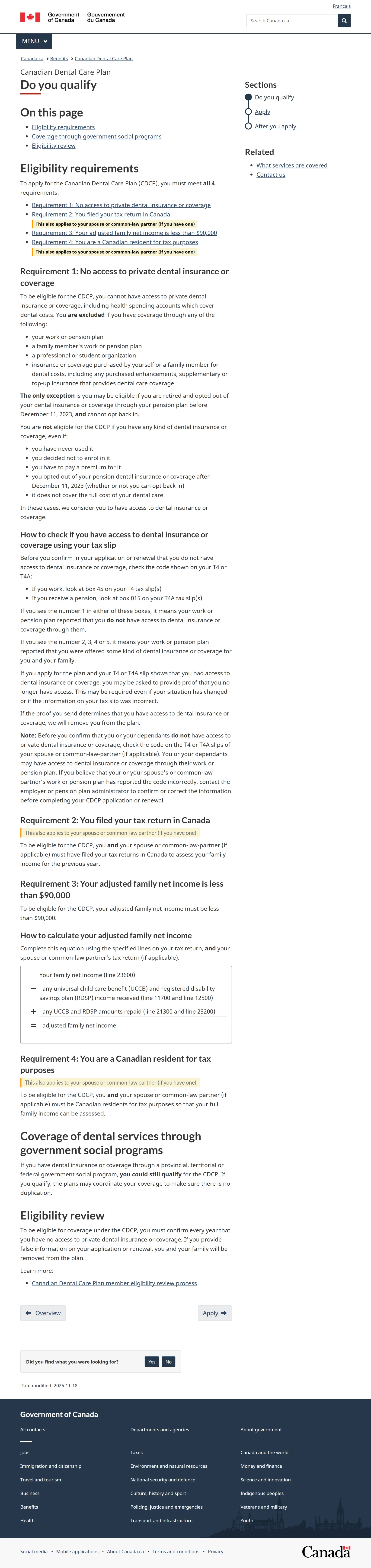
Screen 1 of 34Check if you qualify
Read the four requirements on the canada.ca page, then go to the bottom and press Next: Apply.
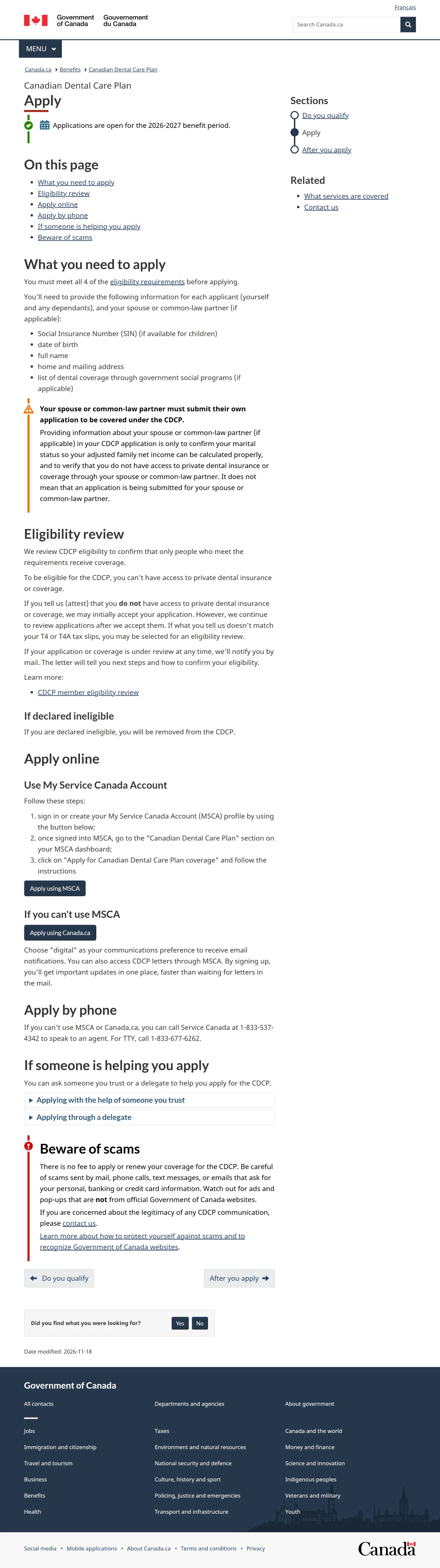
Screen 2 of 34Choose how to apply
Scroll to Apply online and press Apply using Canada.ca. You don't need an account or a login.
Scroll to Apply online and press Apply using MSCA. After you sign in to My Service Canada Account, open the Canadian Dental Care Plan section and choose Apply for Canadian Dental Care Plan coverage. Some of your details may already be filled in. The questions after that are the same as the screens below.
-
Before you start
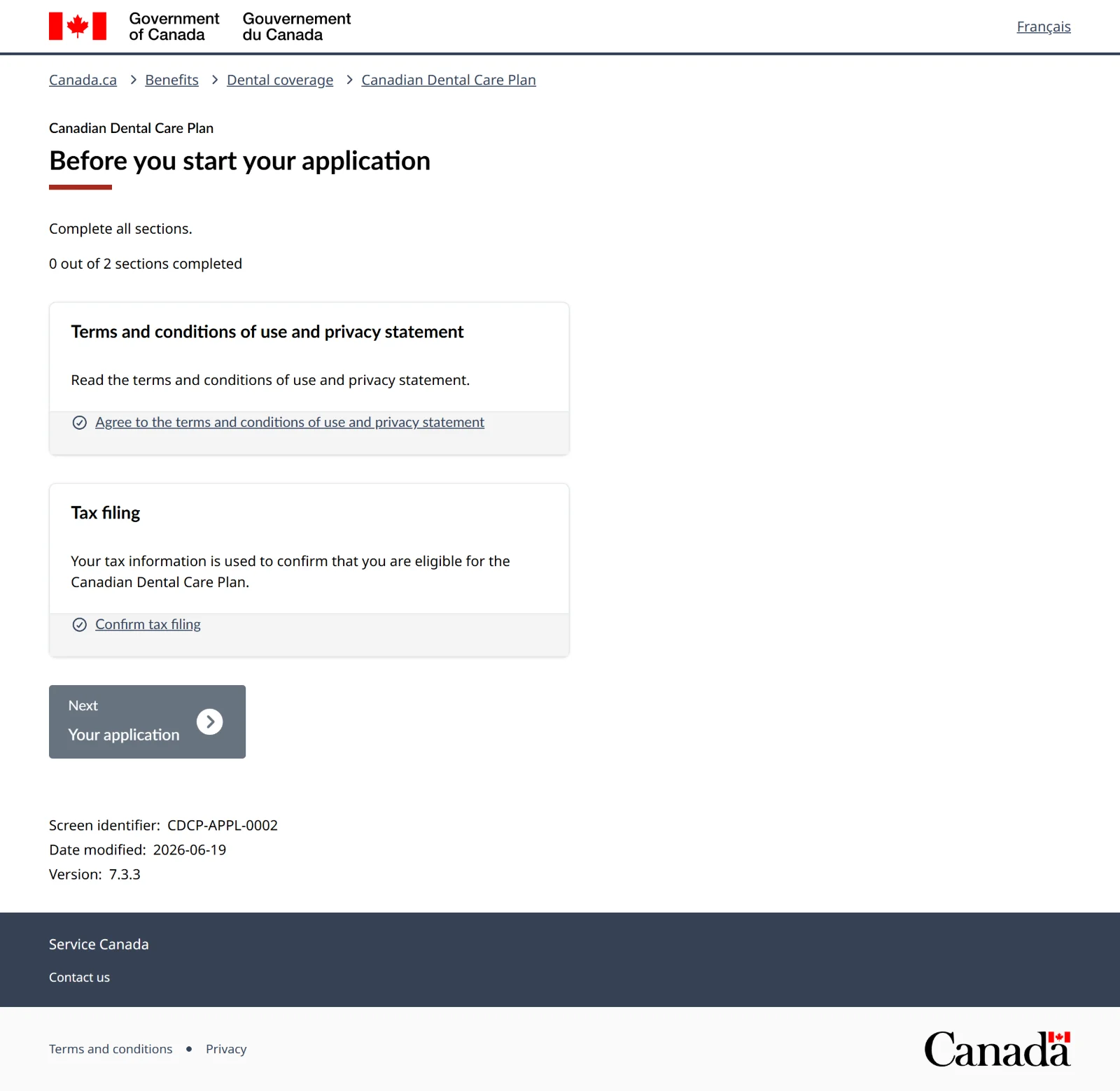
Screen 3 of 34Before you start your application
There are two things to finish before the application opens: the terms, then tax filing. Press the first button to agree to the terms.
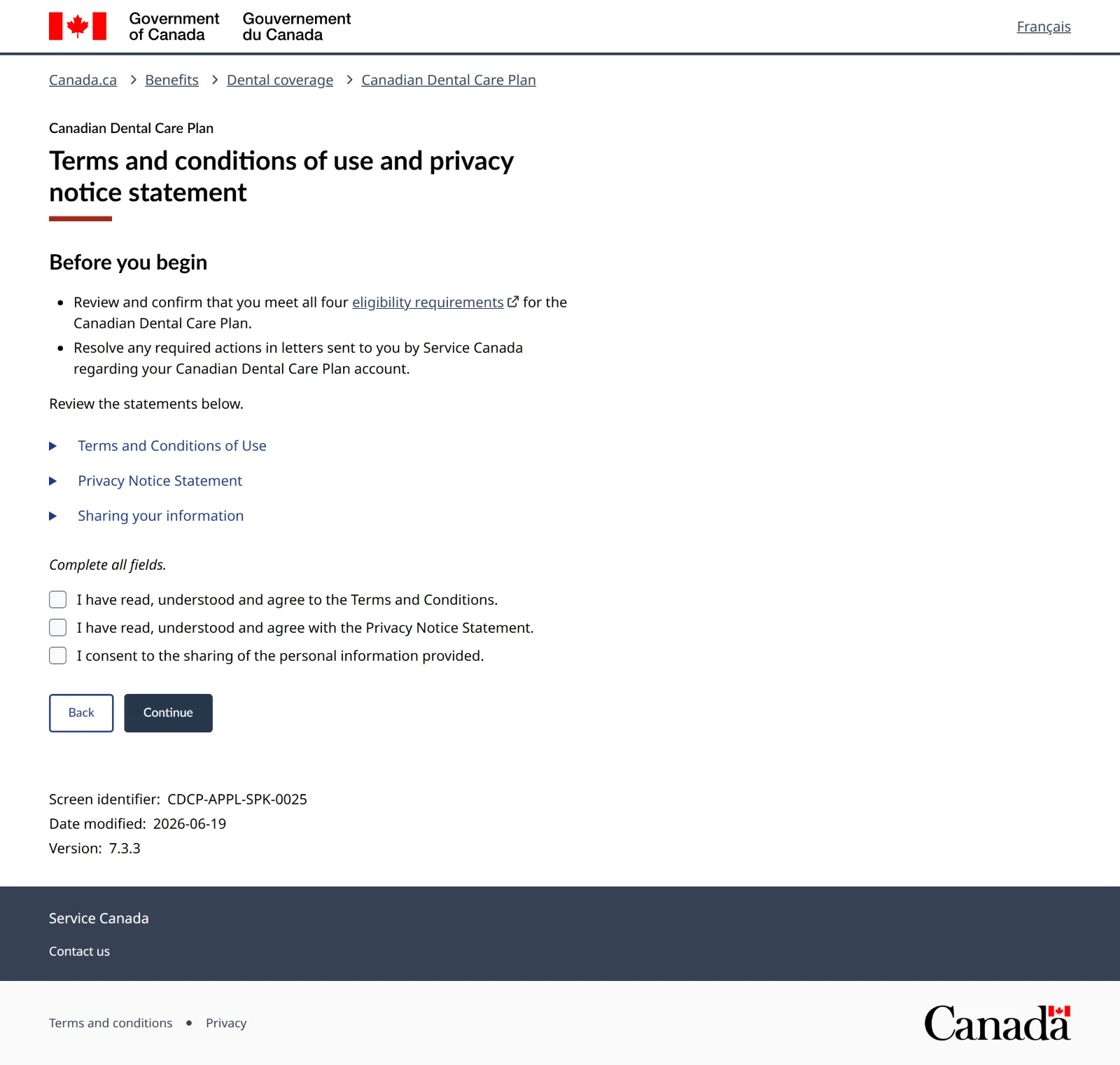
Screen 4 of 34Terms and conditions
Tick all three boxes (terms, privacy notice, consent to share your information), then press Continue.
If you choose "I do not agree"The application stops. You have to agree to all three to apply.
Screen 5 of 34Before you start: 1 of 2 done
Terms now show Complete. Press Confirm tax filing.
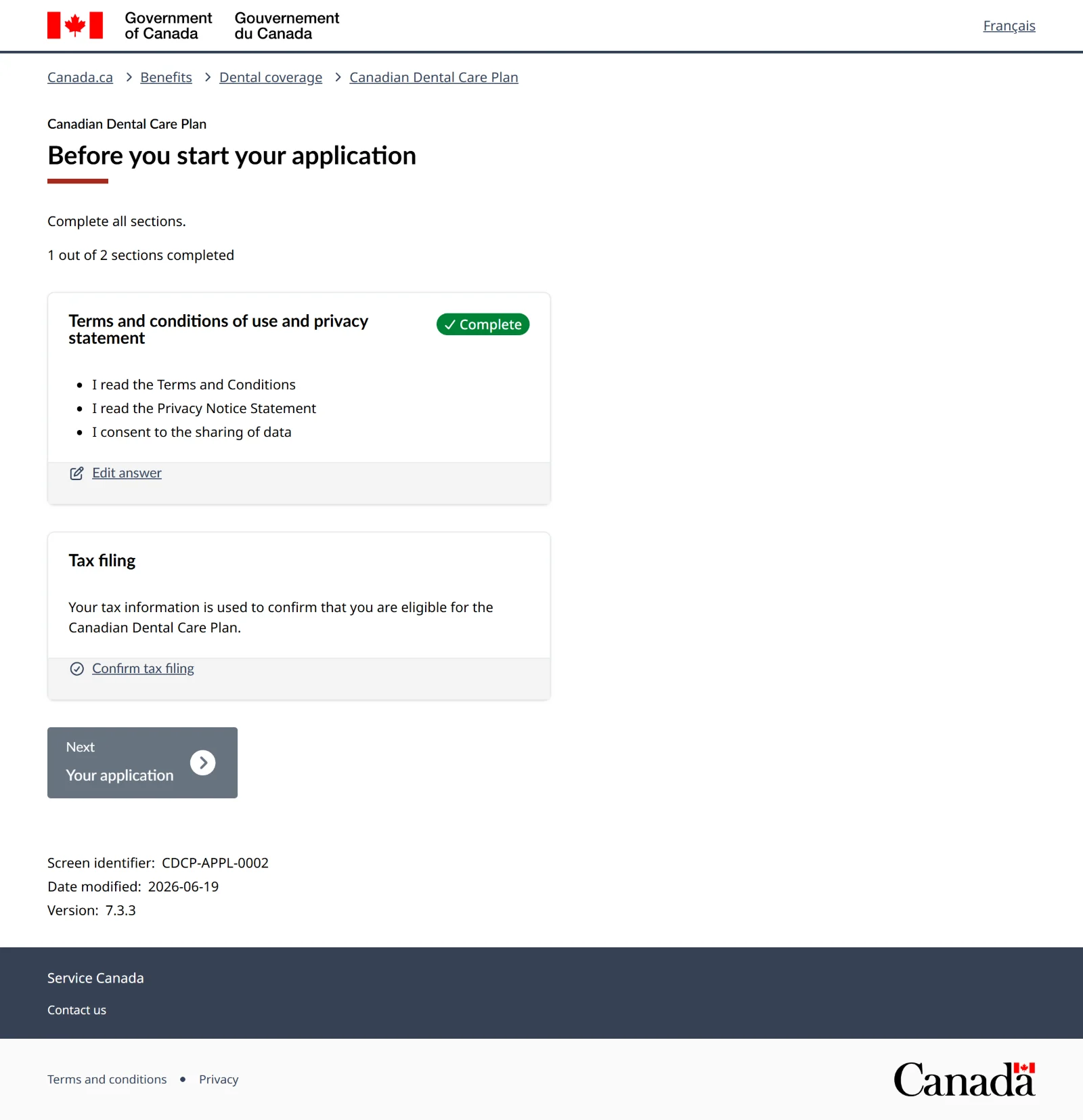
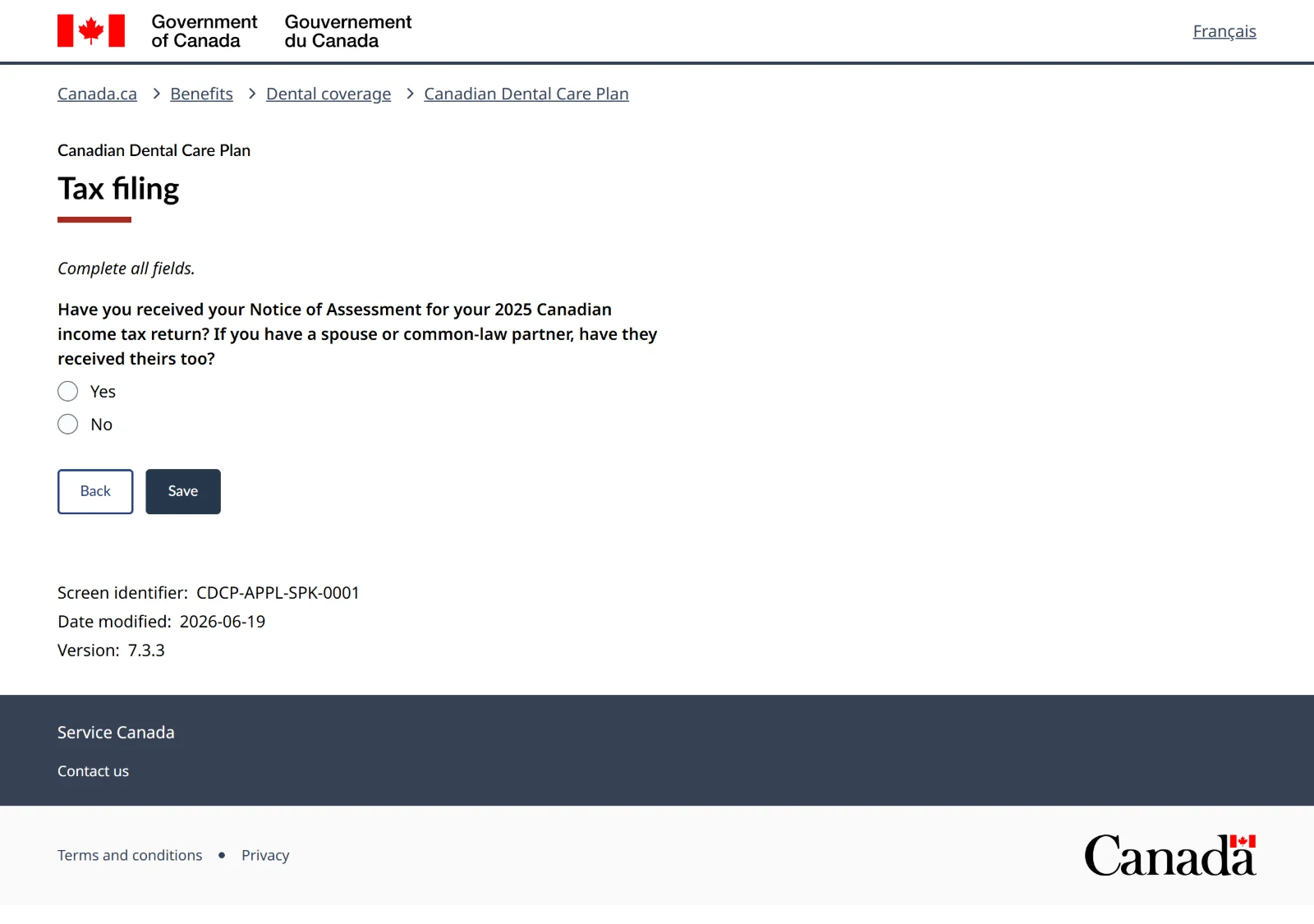
Screen 6 of 34Tax filing
It asks if you've received your Notice of Assessment for your 2025 tax return (and your partner's, if you have one). Answer Yes, then Save.
If the answer is NoThe application stops here. You need to file your 2025 taxes first and wait for the Notice of Assessment. Momentum in Calgary files for free, including past years, by appointment: call 403-272-9323. More options under No tax return filed.
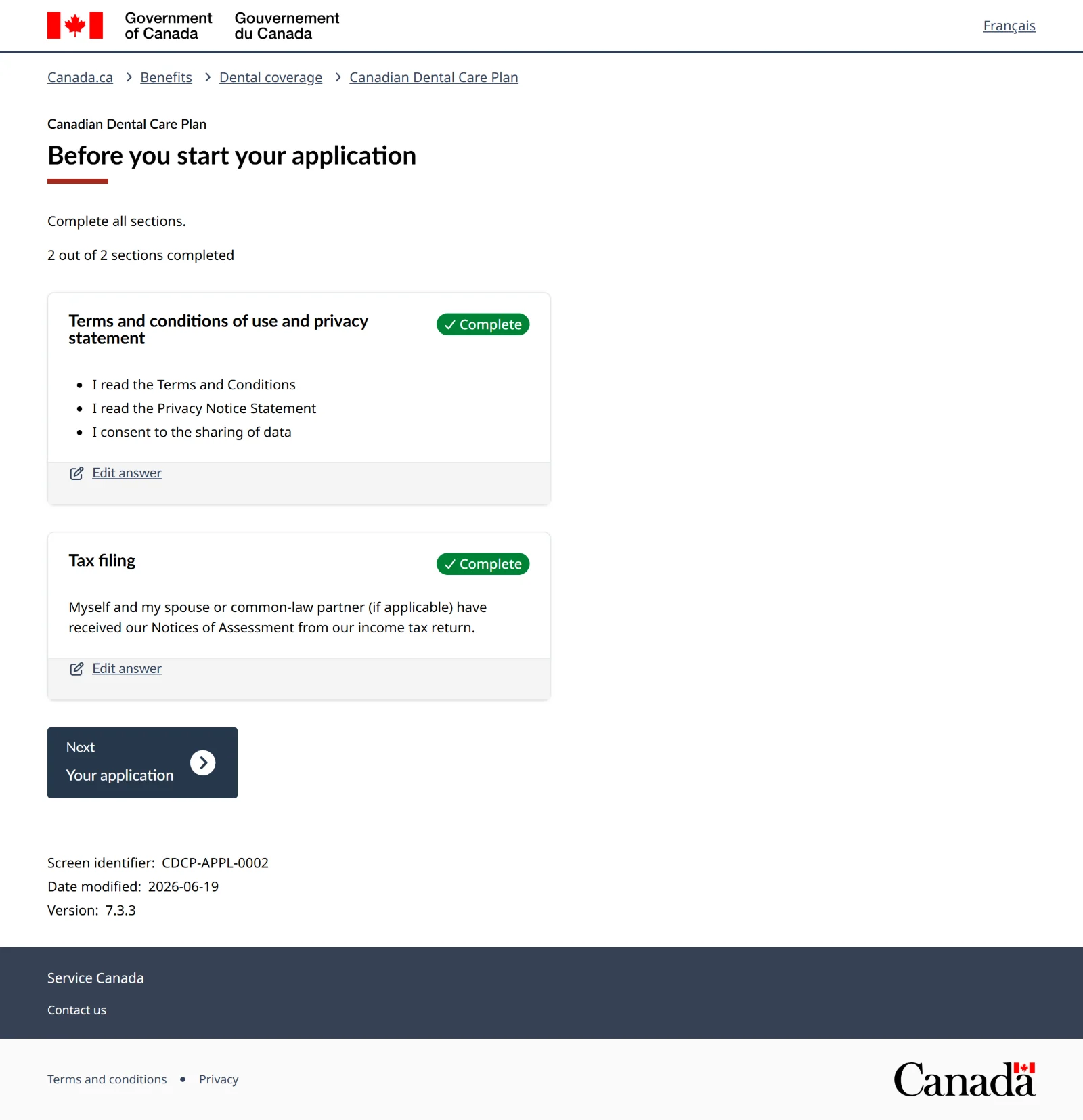
Screen 7 of 34Before you start: both done
Both parts show Complete. Press Next: Your application.
-
Who you're applying for
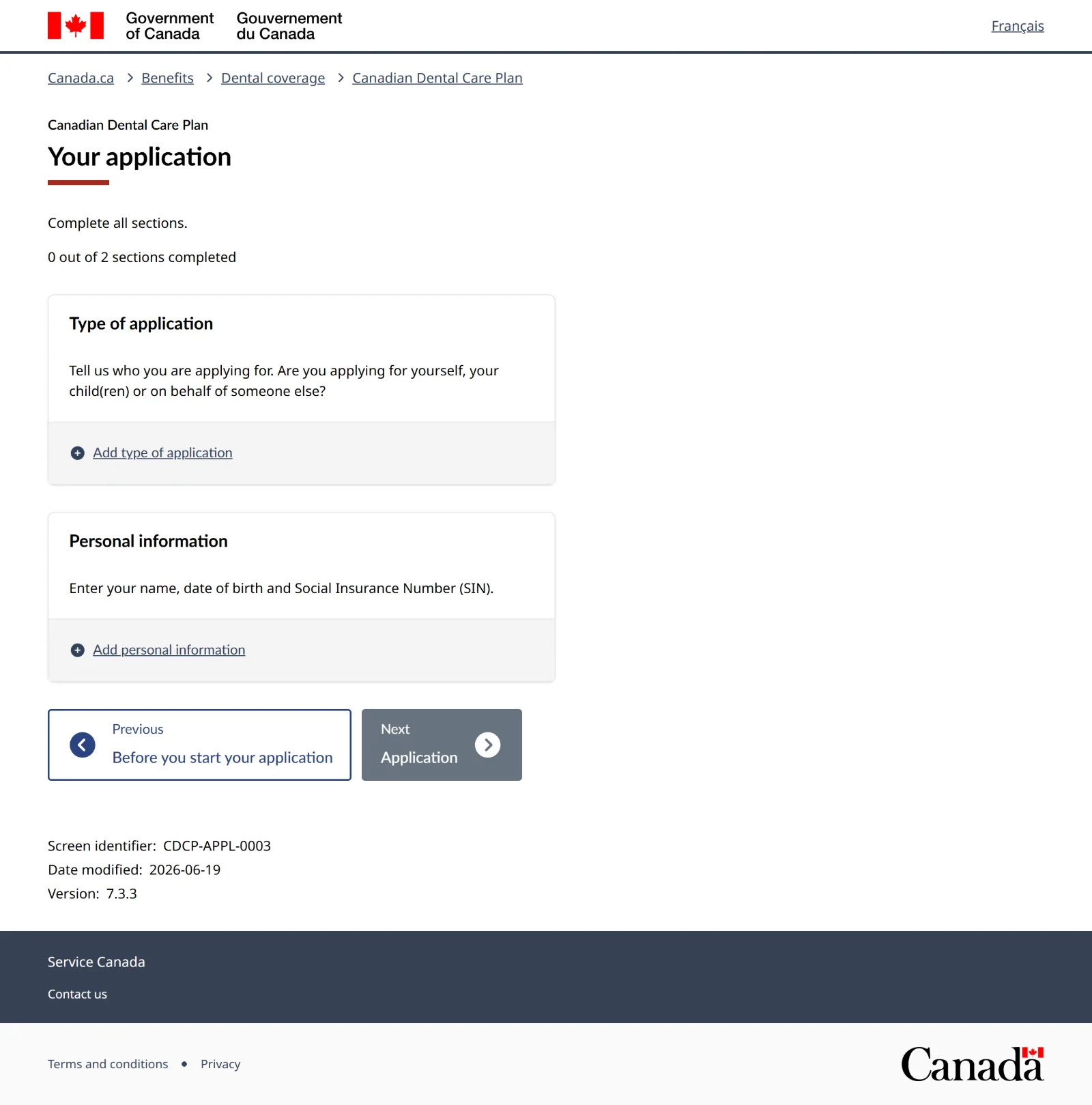
Screen 8 of 34Your application
Two parts here: who the application is for, then your personal details. Press Add type of application.
Screen 9 of 34Type of application
Choose I am applying for myself, then Save.
Other choicesApplying for your kids, or yourself and your kids, adds questions about each child. Applying as someone's legal delegate or power of attorney means sending proof first and applying by phone.
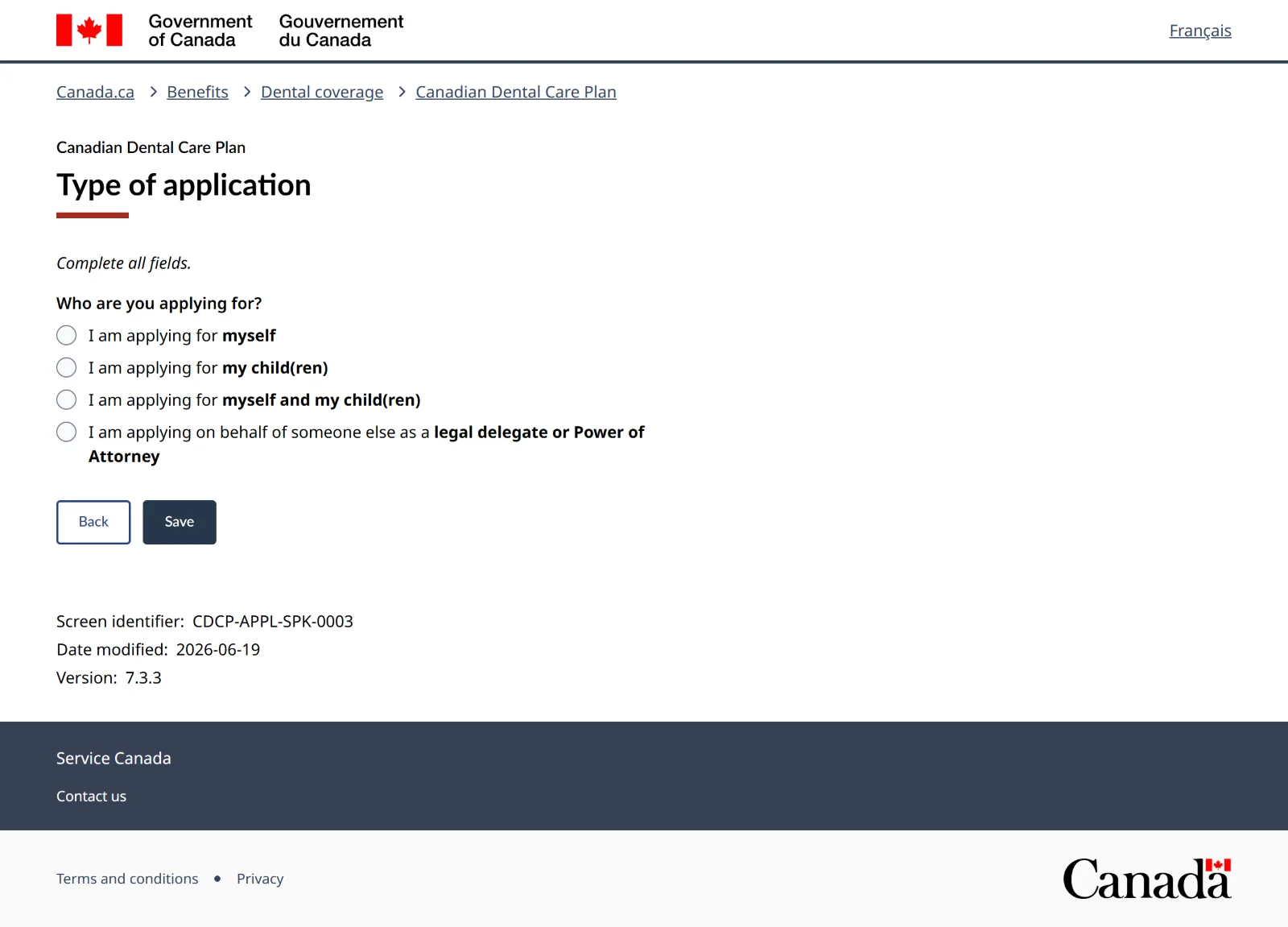
Screen 10 of 34Your application: 1 of 2 done
Press Add personal information.
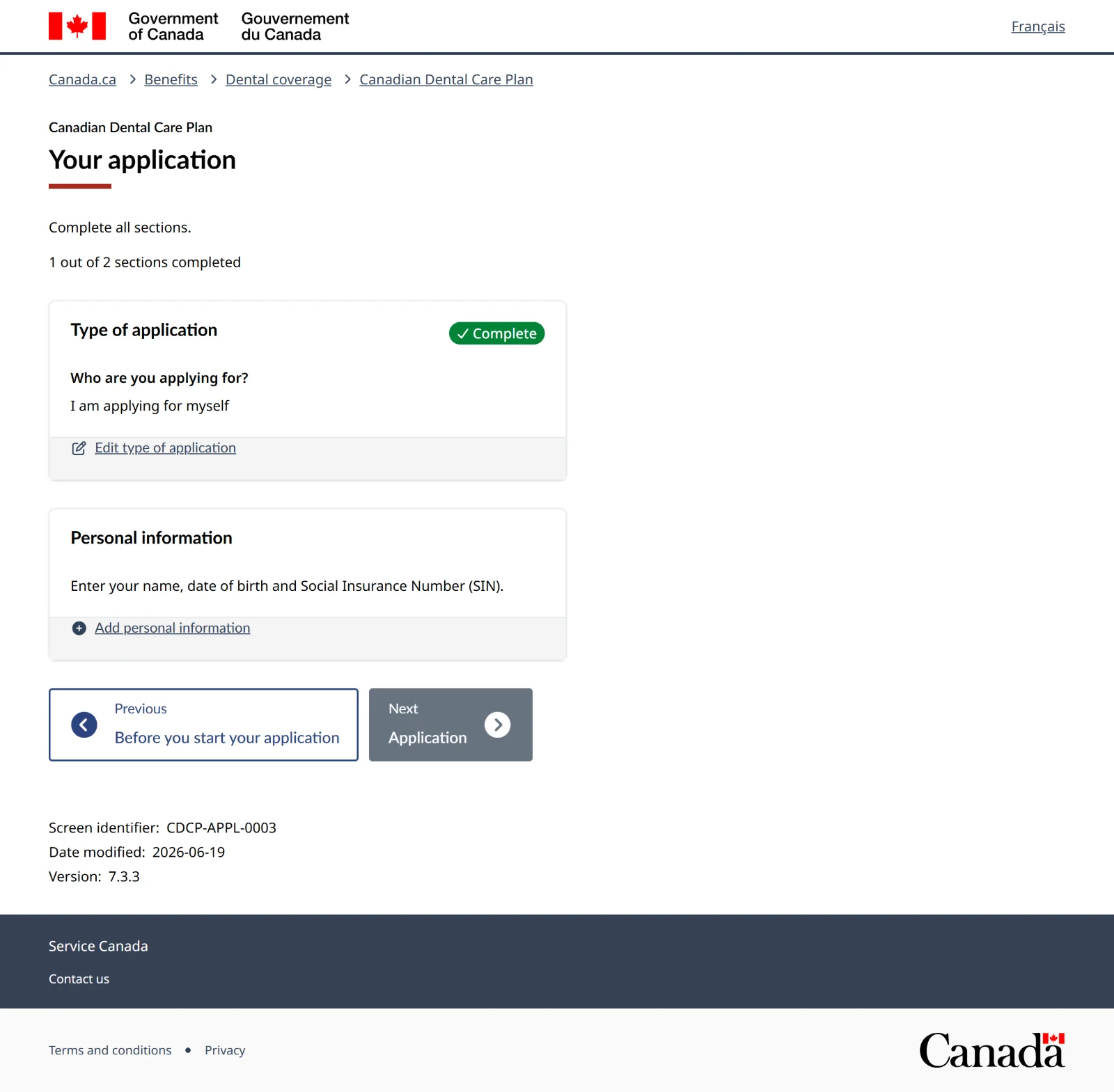
Screen 11 of 34Personal information
Enter your first name, last name, date of birth and 9-digit SIN, then Save. Your name must match your SIN record exactly.
Only one legal name?Put it in both the first name and last name boxes.
Name doesn't match your SIN recordA different spelling or an old last name can delay or block the application. See Name doesn't match.
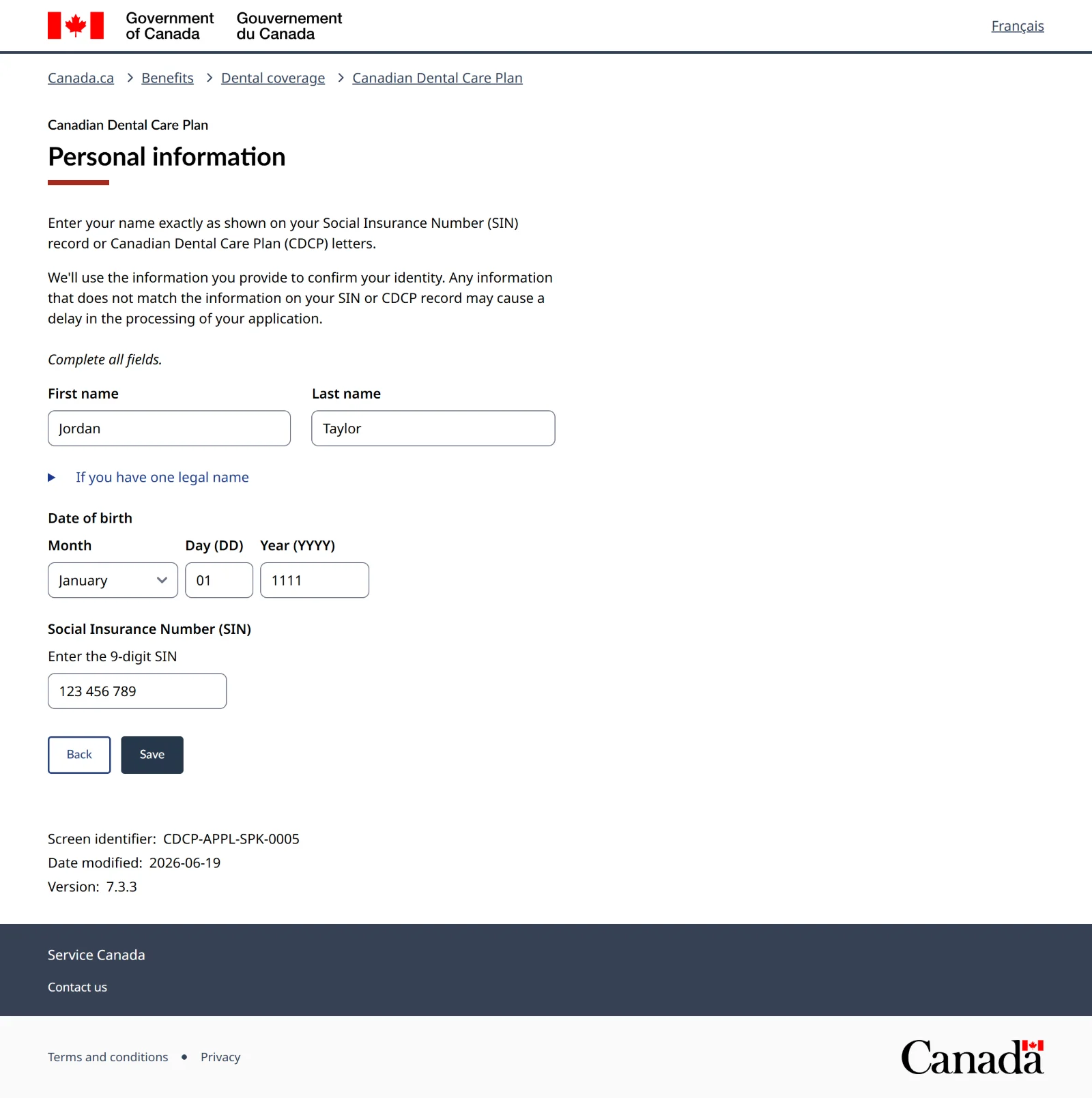
Screen 12 of 34Your application: both done
Check your details, then press Next: Application.
-
Marital status
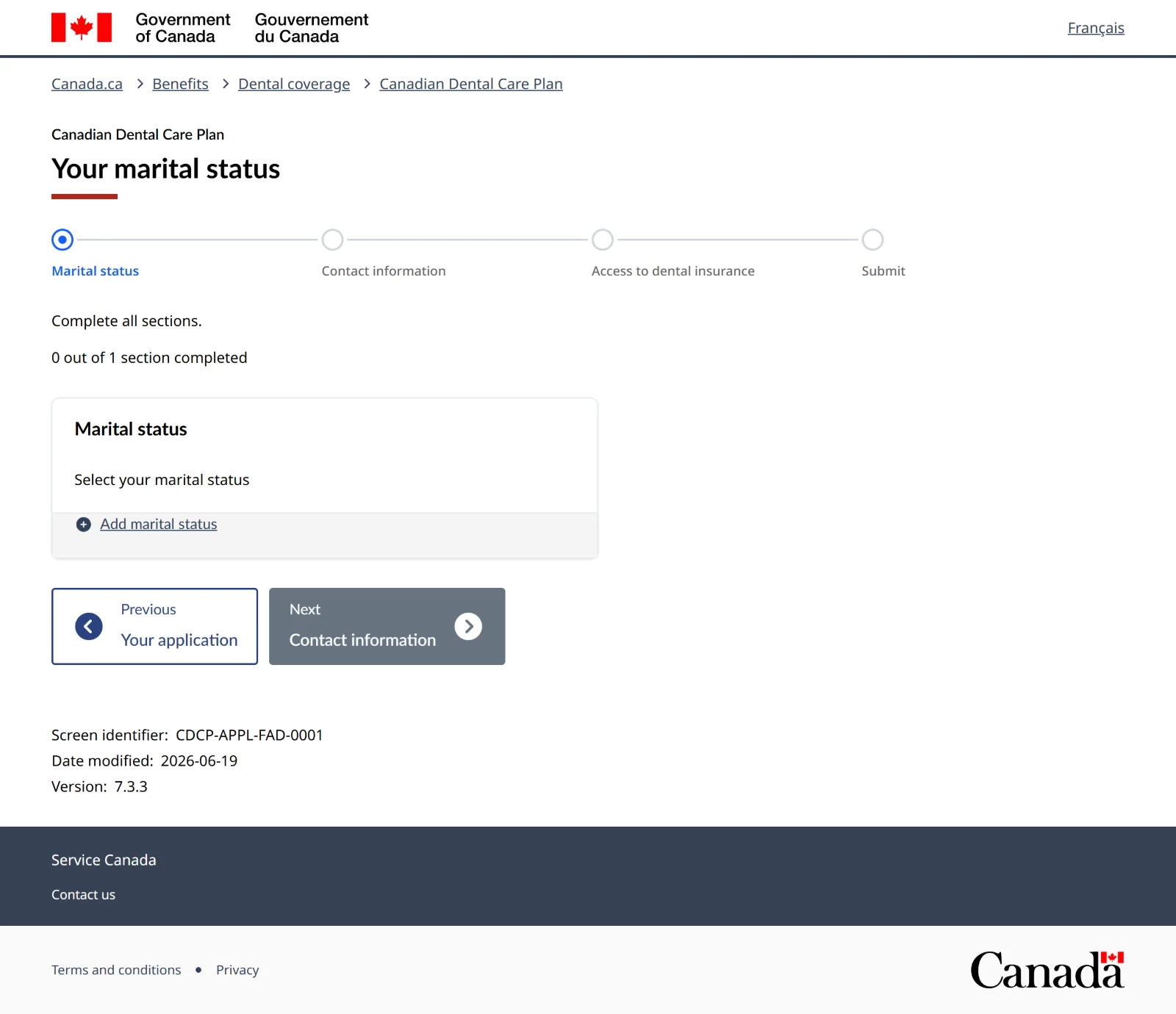
Screen 13 of 34Your marital status
The bar at the top shows the four parts left. Press Add marital status.
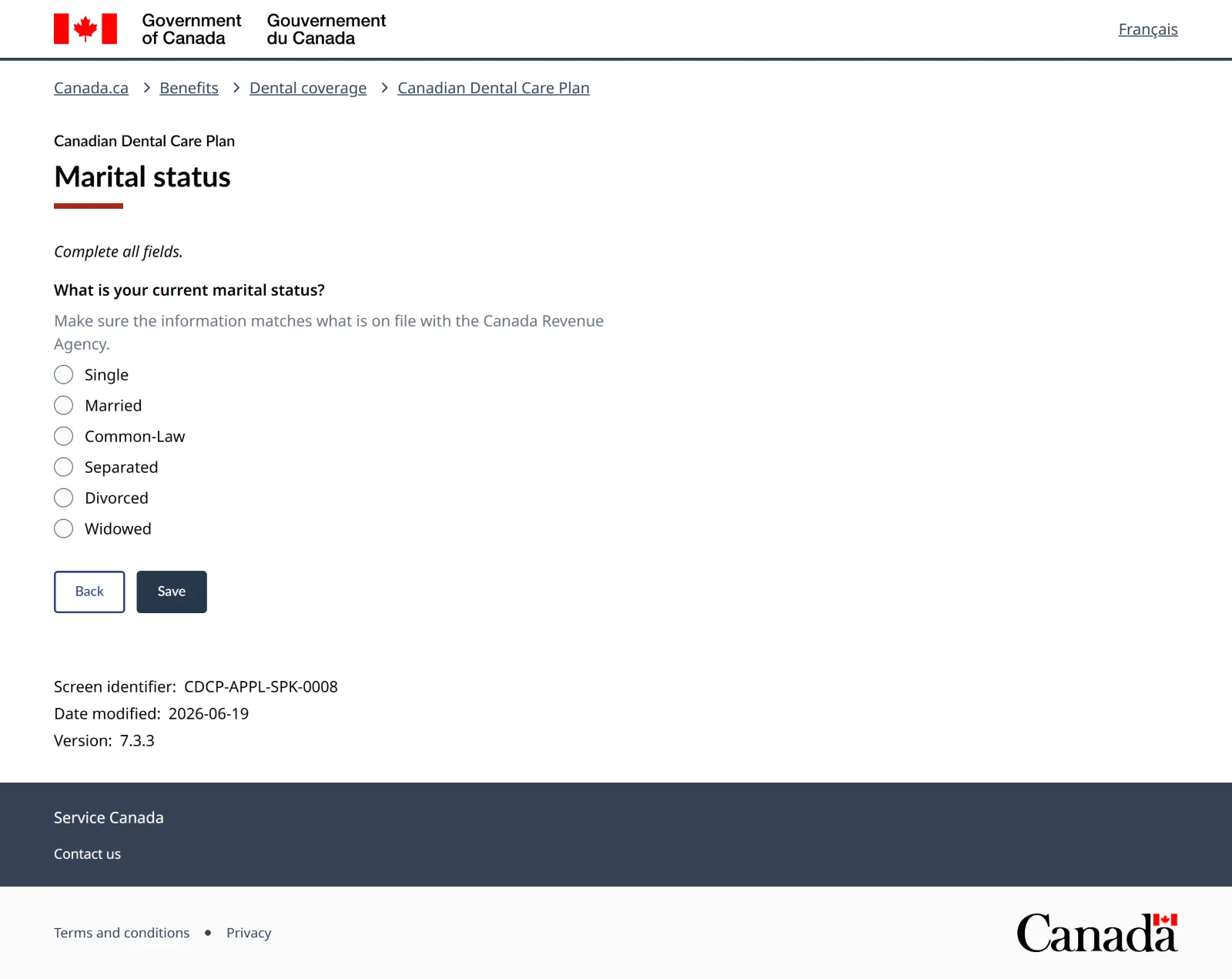
Screen 14 of 34Marital status
Choose the status the Canada Revenue Agency has on file for you, then Save.
If you choose Married or Common-LawAn extra screen asks for your partner's SIN and year of birth, and you tick a box to confirm they agreed to share it. Their income counts toward the $90,000 limit, and they must have filed their taxes too. If they want coverage too, they apply on their own. Separated people don't need to give partner details.
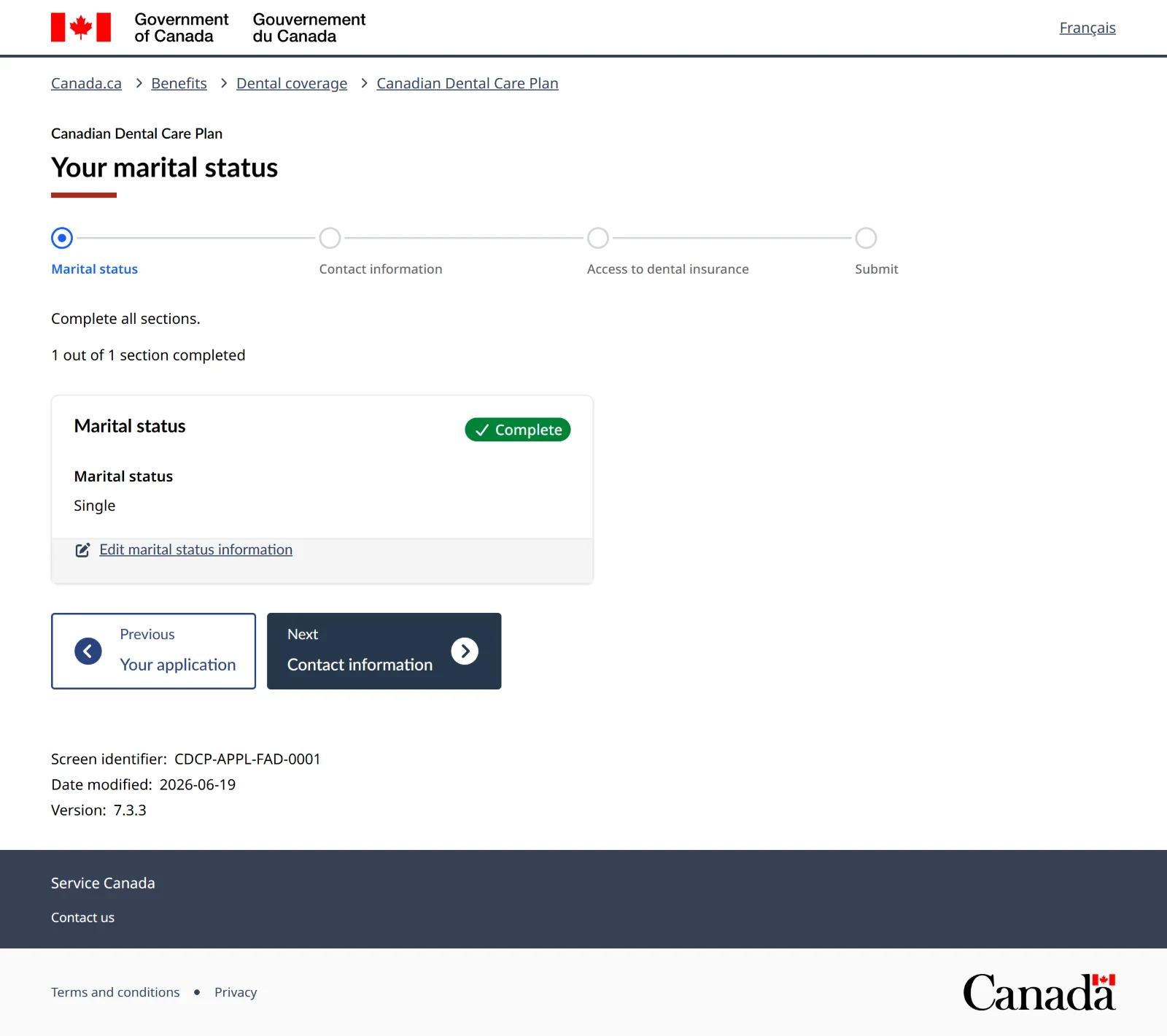
Screen 15 of 34Marital status done
Press Next: Contact information.
-
Contact information
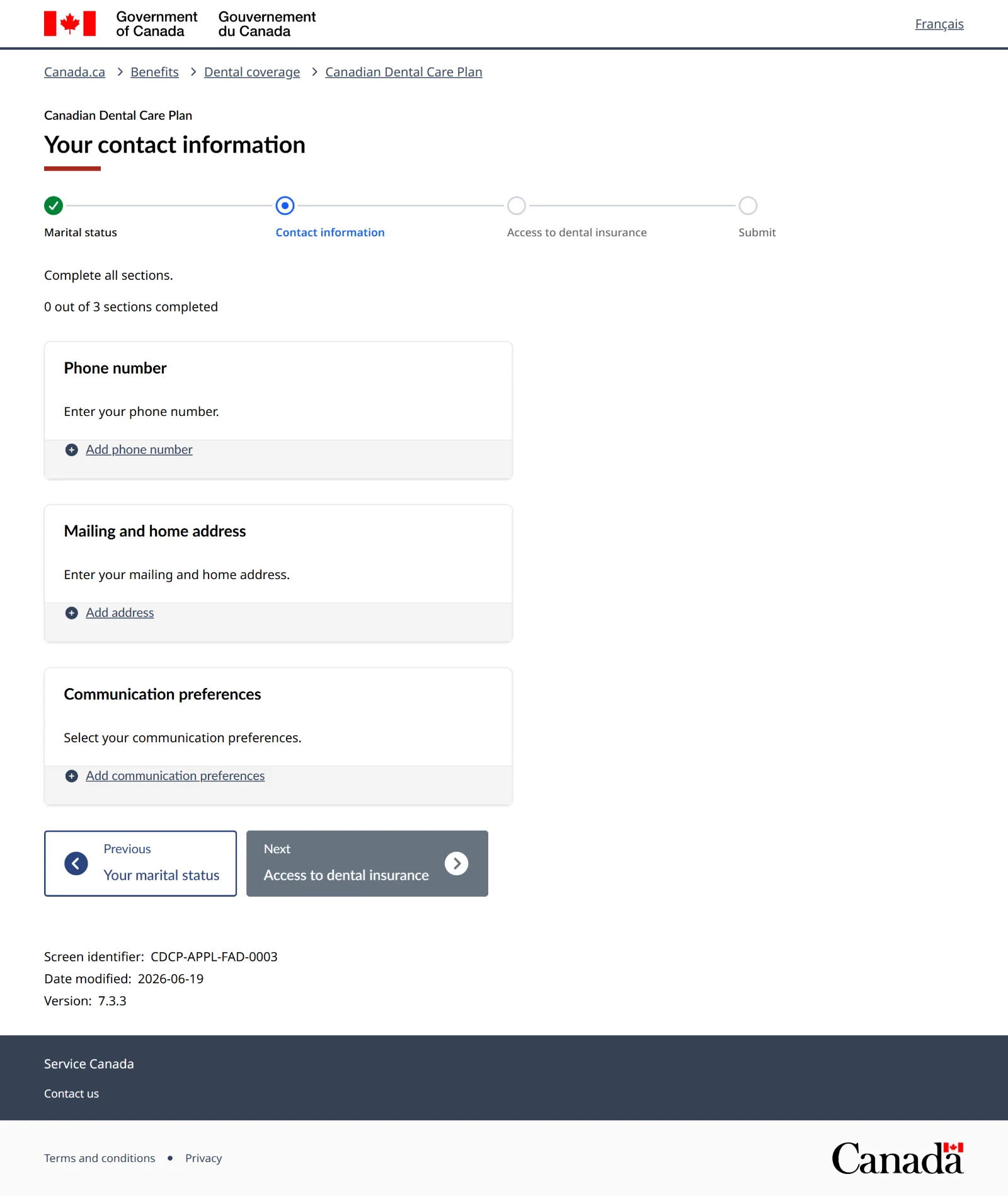
Screen 16 of 34Your contact information
Three parts: phone, address, and how they contact you. Press Add phone number.
Screen 17 of 34Phone number
Enter a 10-digit Canadian number. The second number is optional. Then Save.
No phone?A phone number is required to apply online. You can use a number where you can be reached, like your house's office line. If there's none, apply by phone at 1-833-537-4342 or at a Service Canada Centre.
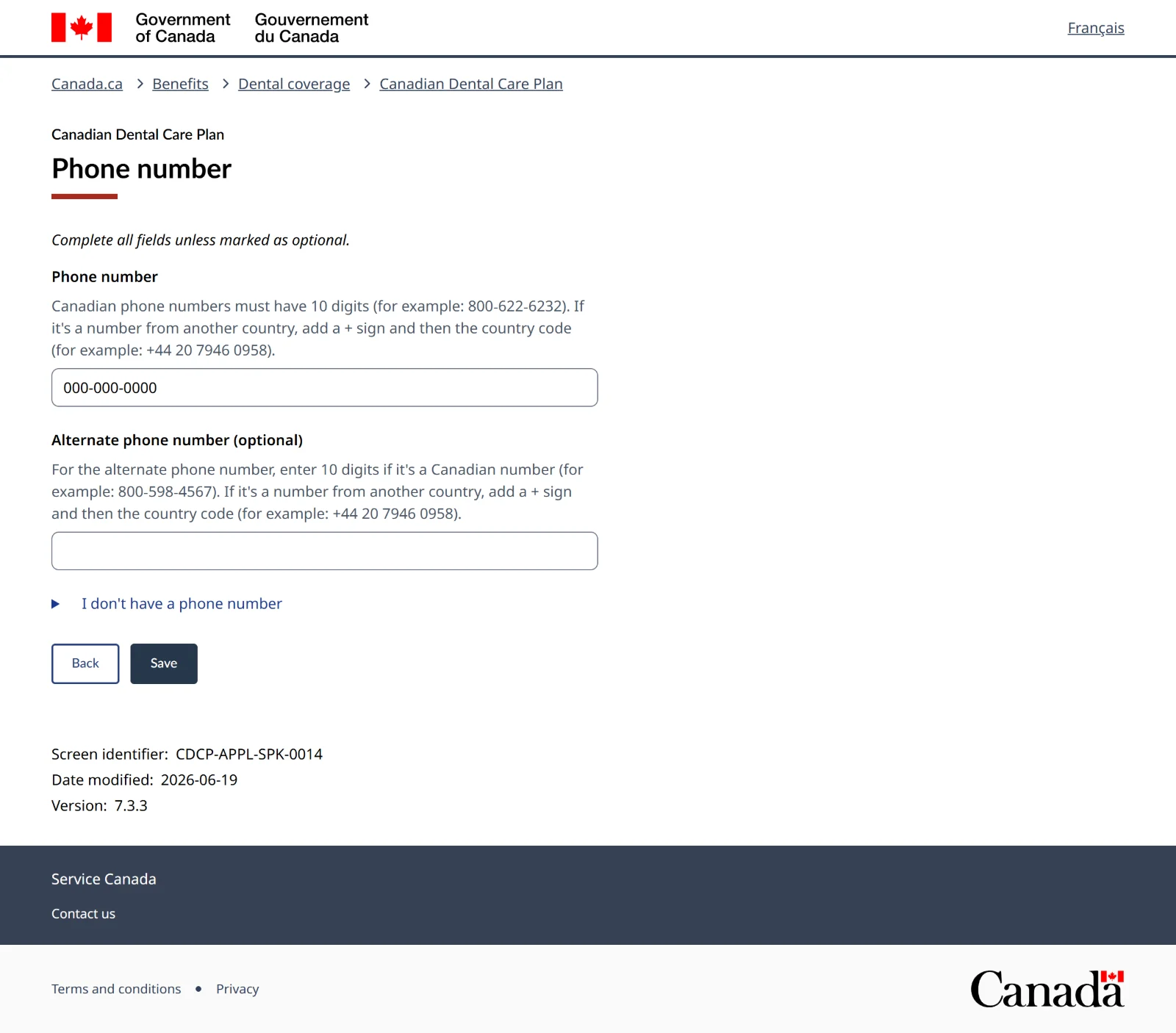
Screen 18 of 34Contact information: 1 of 3 done
Press Add address.
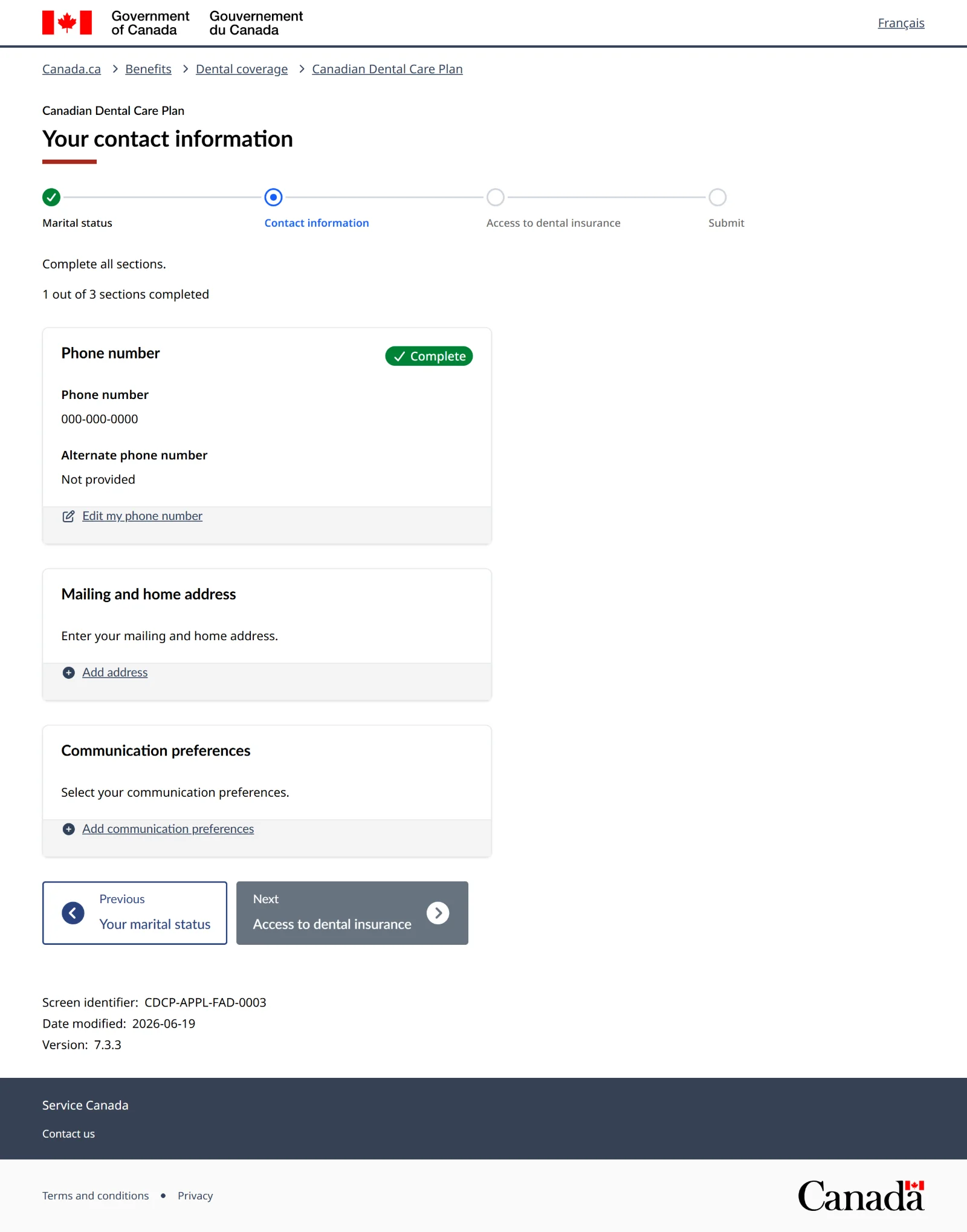
Screen 19 of 34Mailing address
Enter street, city, province and postal code. If you live at the same address, tick Use this address as my home address. Then Continue.
Living in a shelter, recovery home or halfway house?Use that address. Put your unit or room number, or "c/o" and the house name, in the Apartment line. Your letters and dental card come by mail, so use an address where you'll get your mail.
"Address not found"If the address checker can't find it but you know it's right, tick I confirm that the address I entered is correct and keep going. If it suggests a corrected address, you can pick either one.
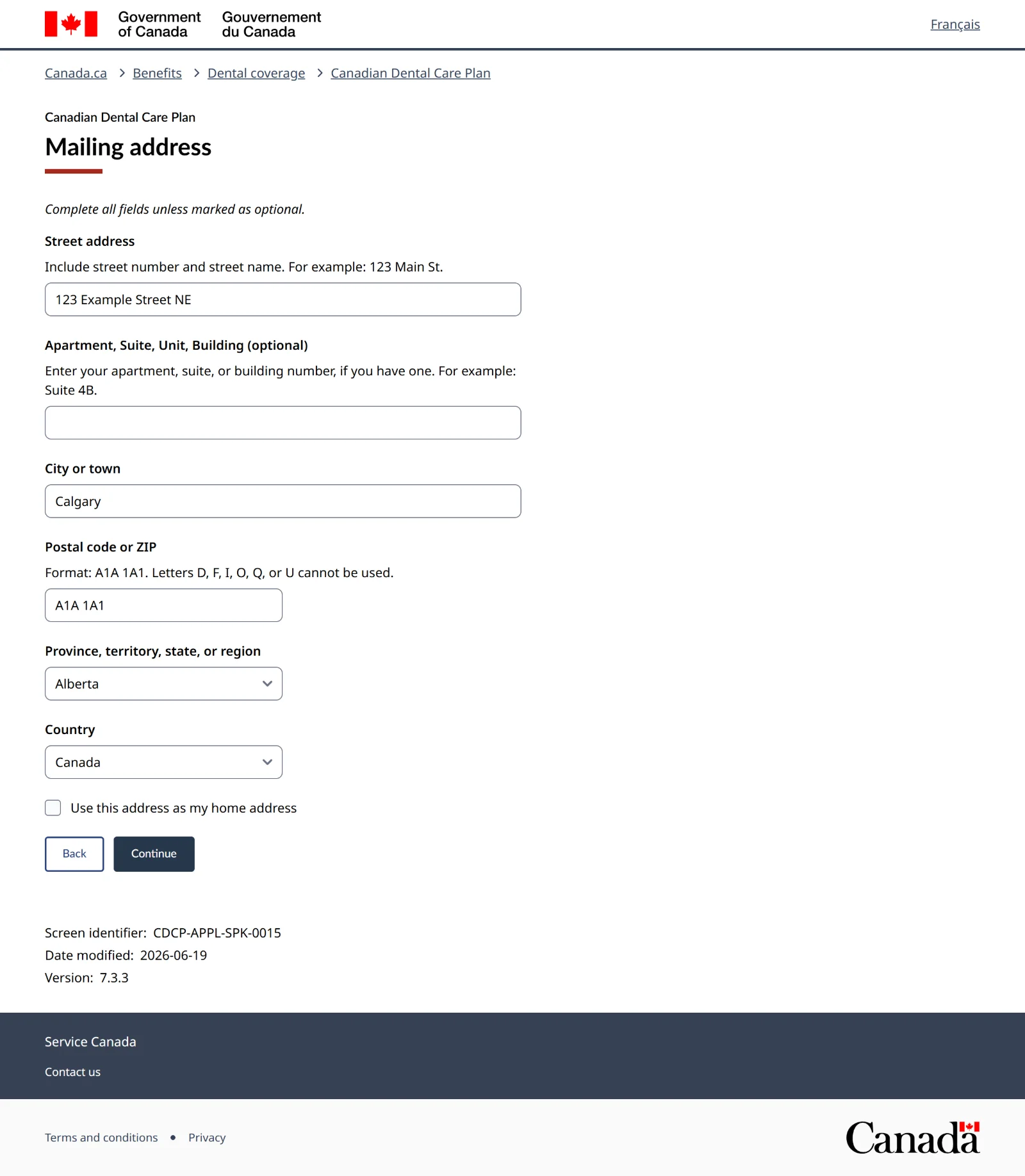
Screen 20 of 34Contact information: 2 of 3 done
Press Add communication preferences.
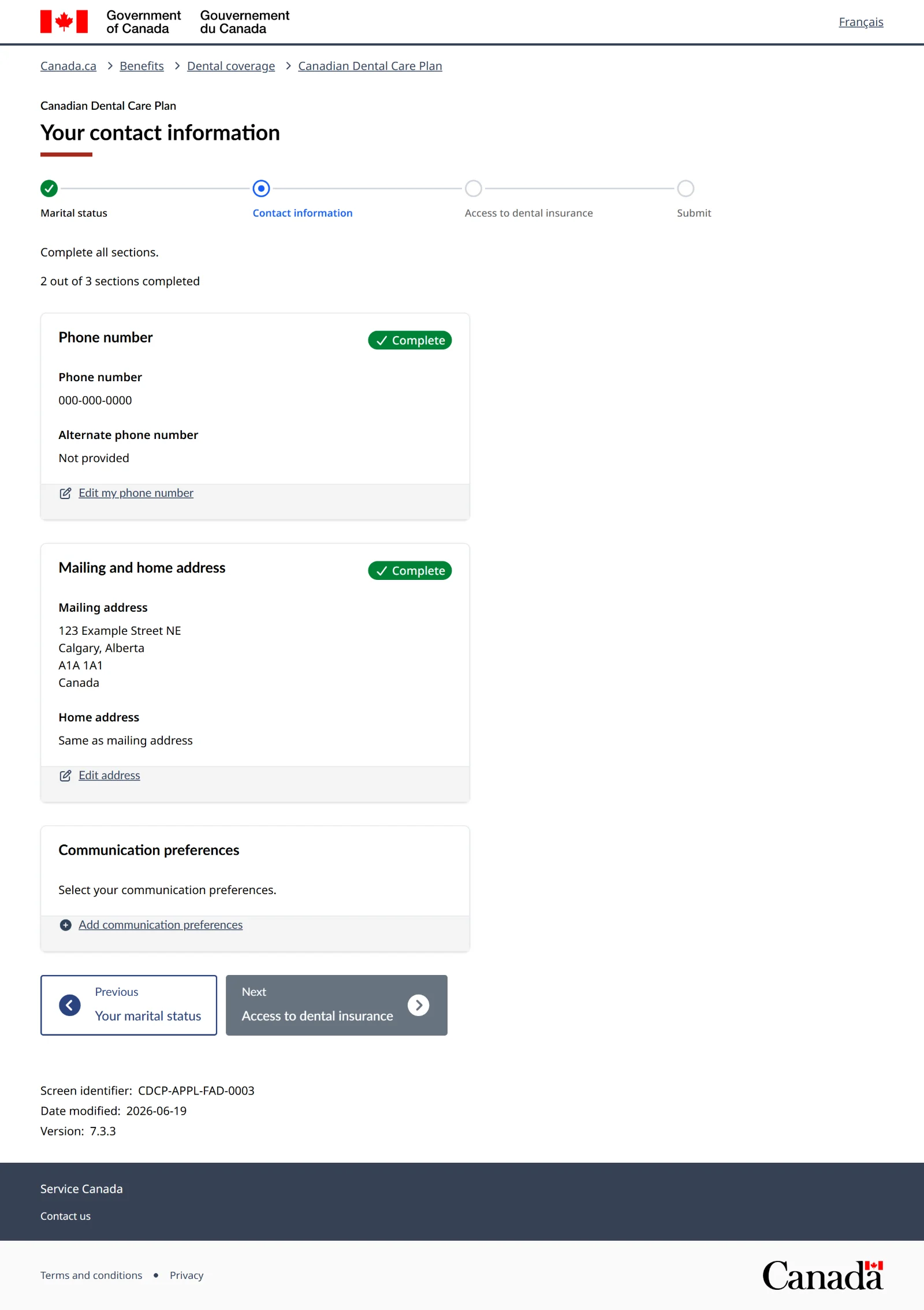
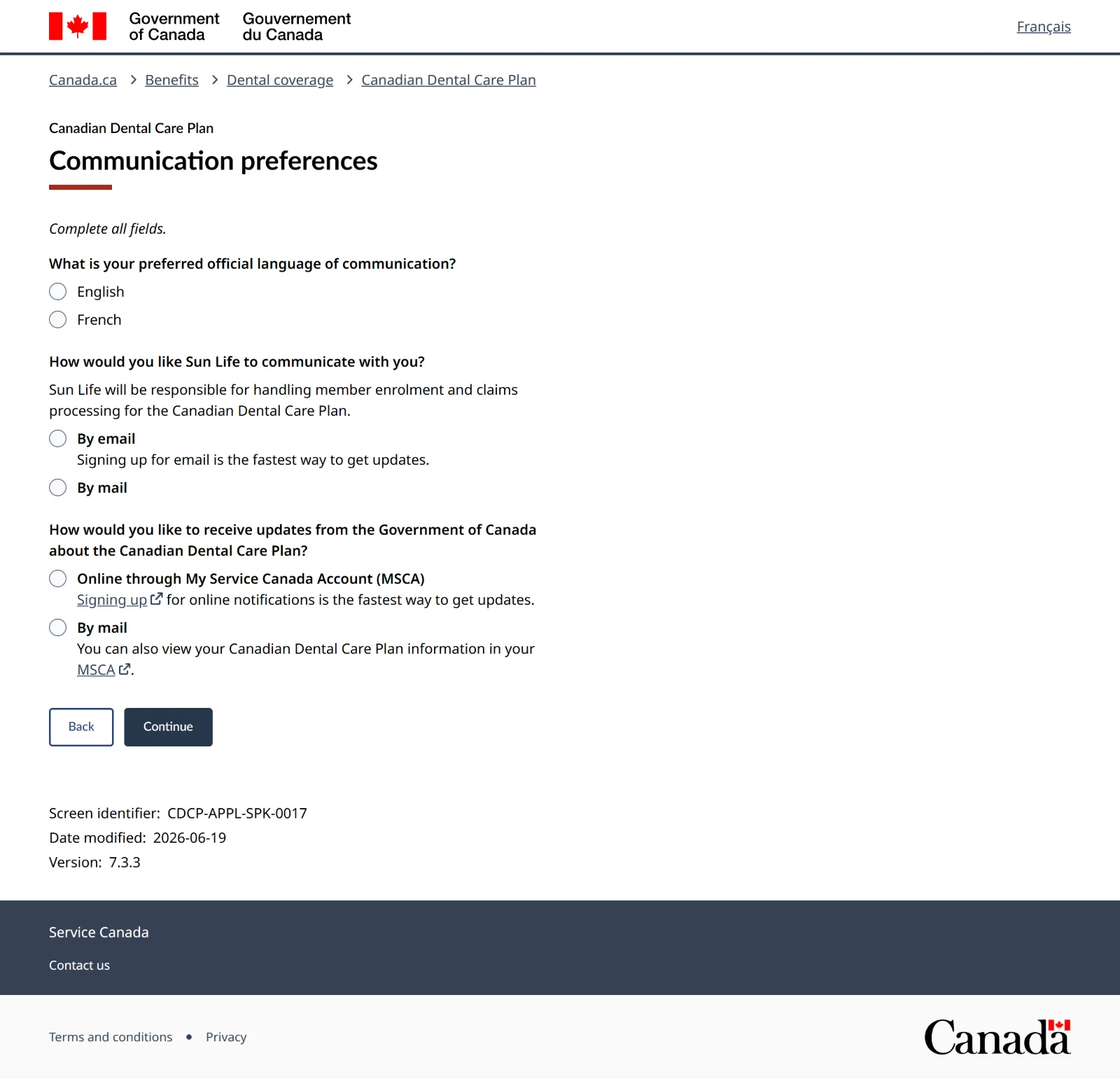
Screen 21 of 34Communication preferences
Pick your language, how Sun Life (who runs the plan) contacts you, and how the government sends you updates. Then Continue.
With a My Service Canada Account, you can pick Online through My Service Canada Account for government updates and read your letters there.
No email, or not checking it?Choose By mail for both questions. That skips the next four screens (email and verification code), so jump to screen 26.
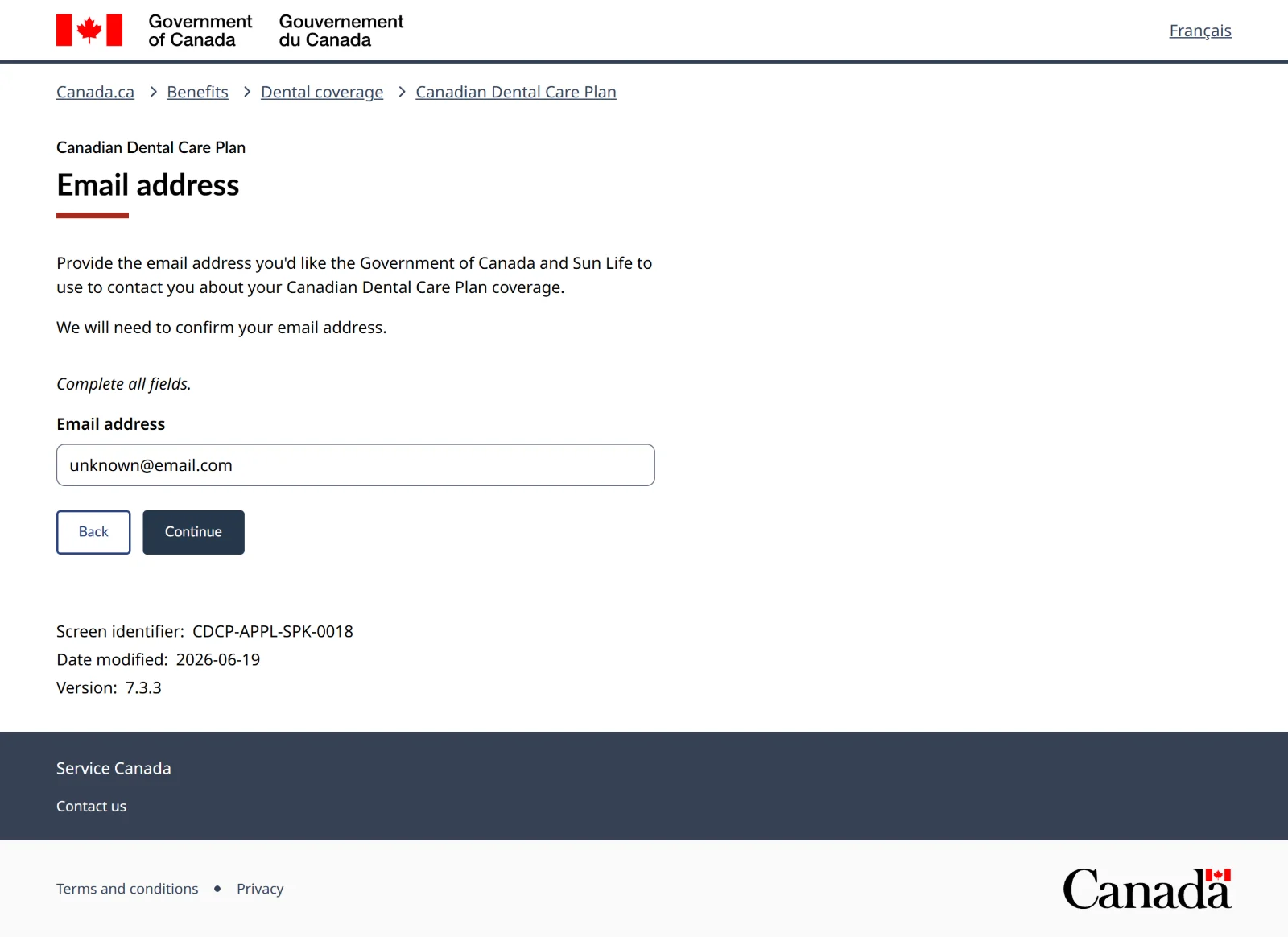
Screen 22 of 34Email address
Only if you chose email. Enter an address you can open right now, because a code is sent to it. Then Continue.
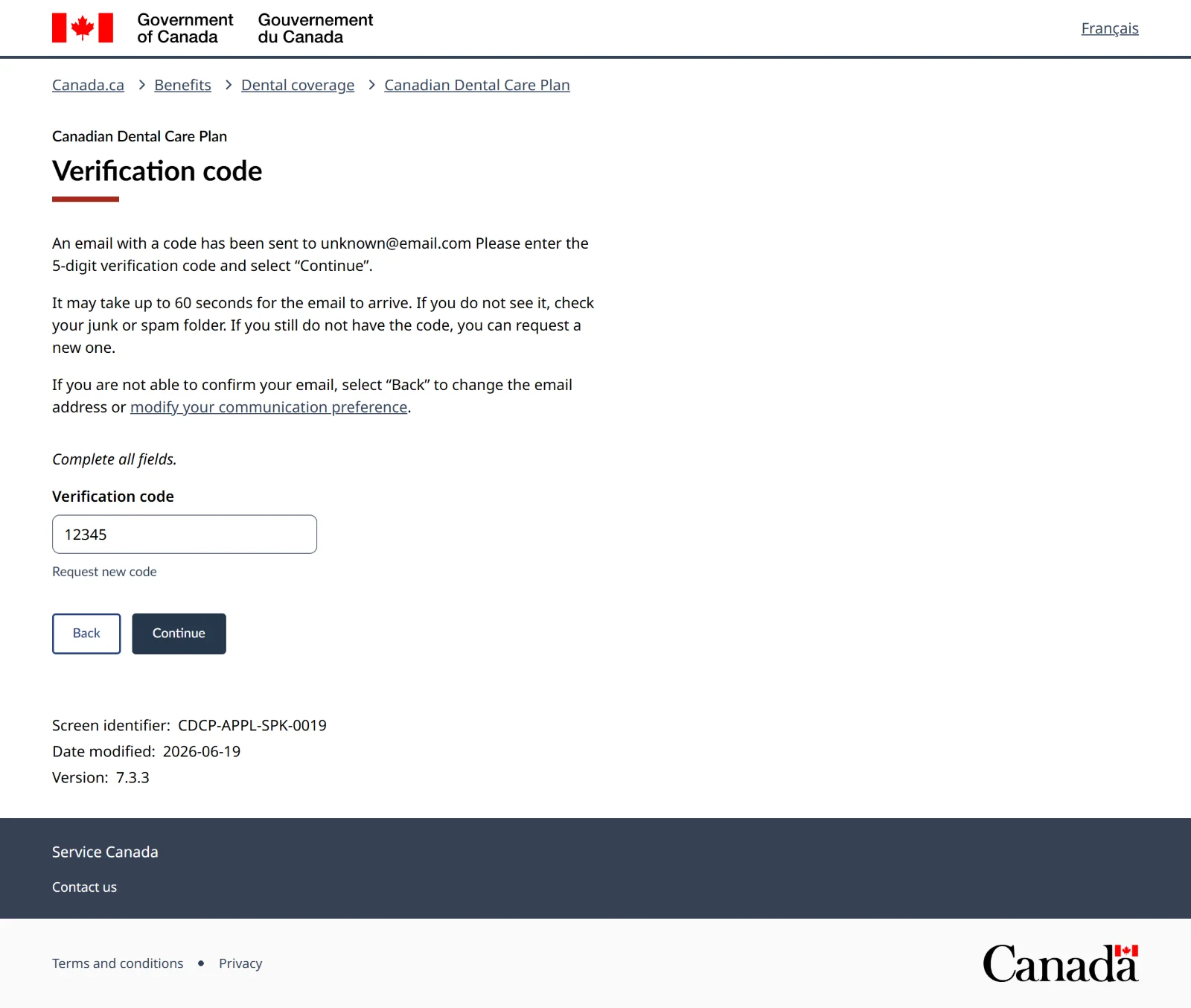
Screen 23 of 34Verification code
Open your email, find the 5-digit code, type it here, and press Continue.
Code not working?The email can take a minute, so check spam too. After 5 wrong tries you'll need a new code.
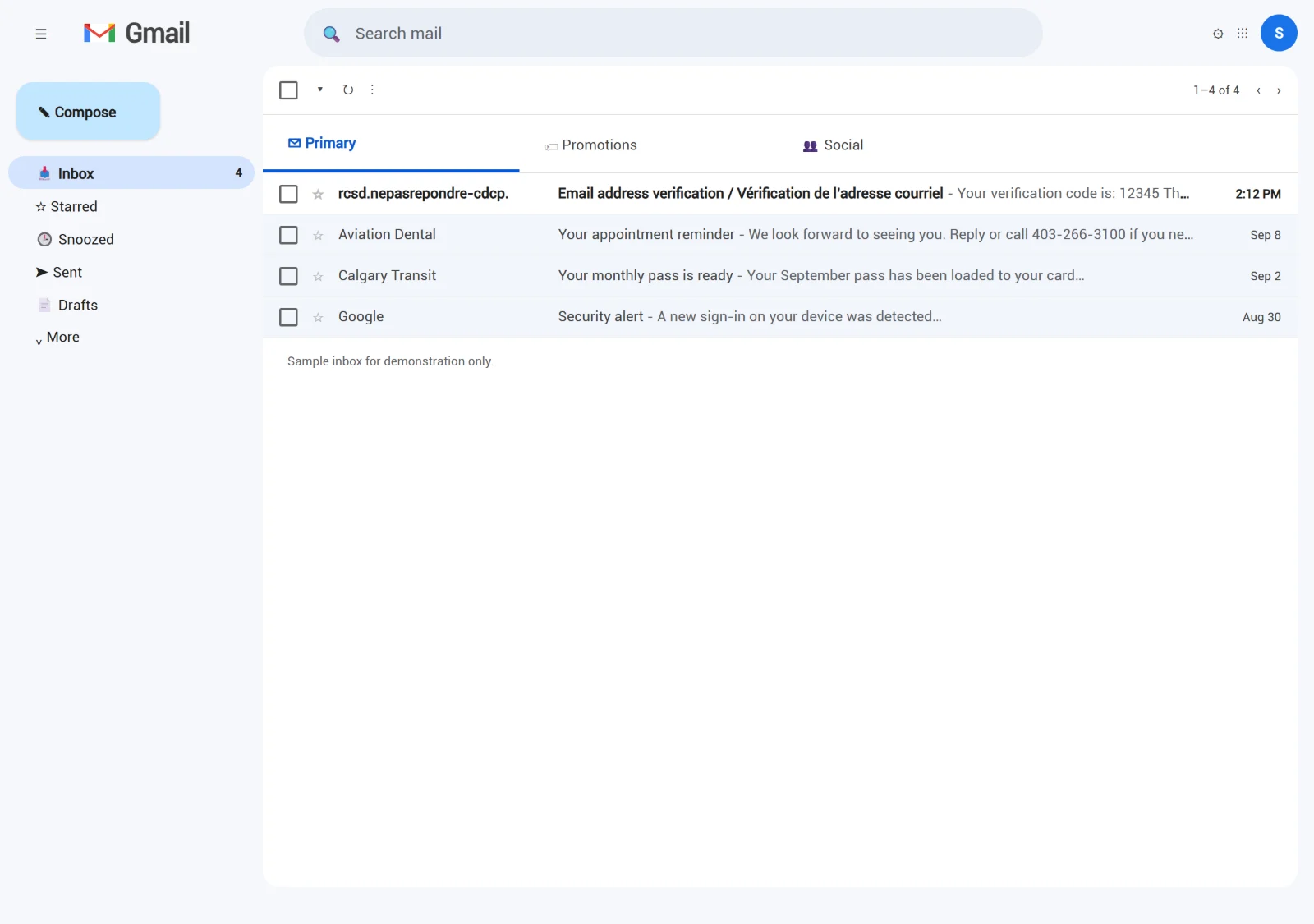
Screen 24 of 34Your email inbox
The email comes from notification.canada.ca. Open it. (Your email will look different. This is an example.)
Screen 25 of 34The verification email
The 5-digit code is at the top, in English and French. Go back to the application tab and type it in. The code only works for this session.
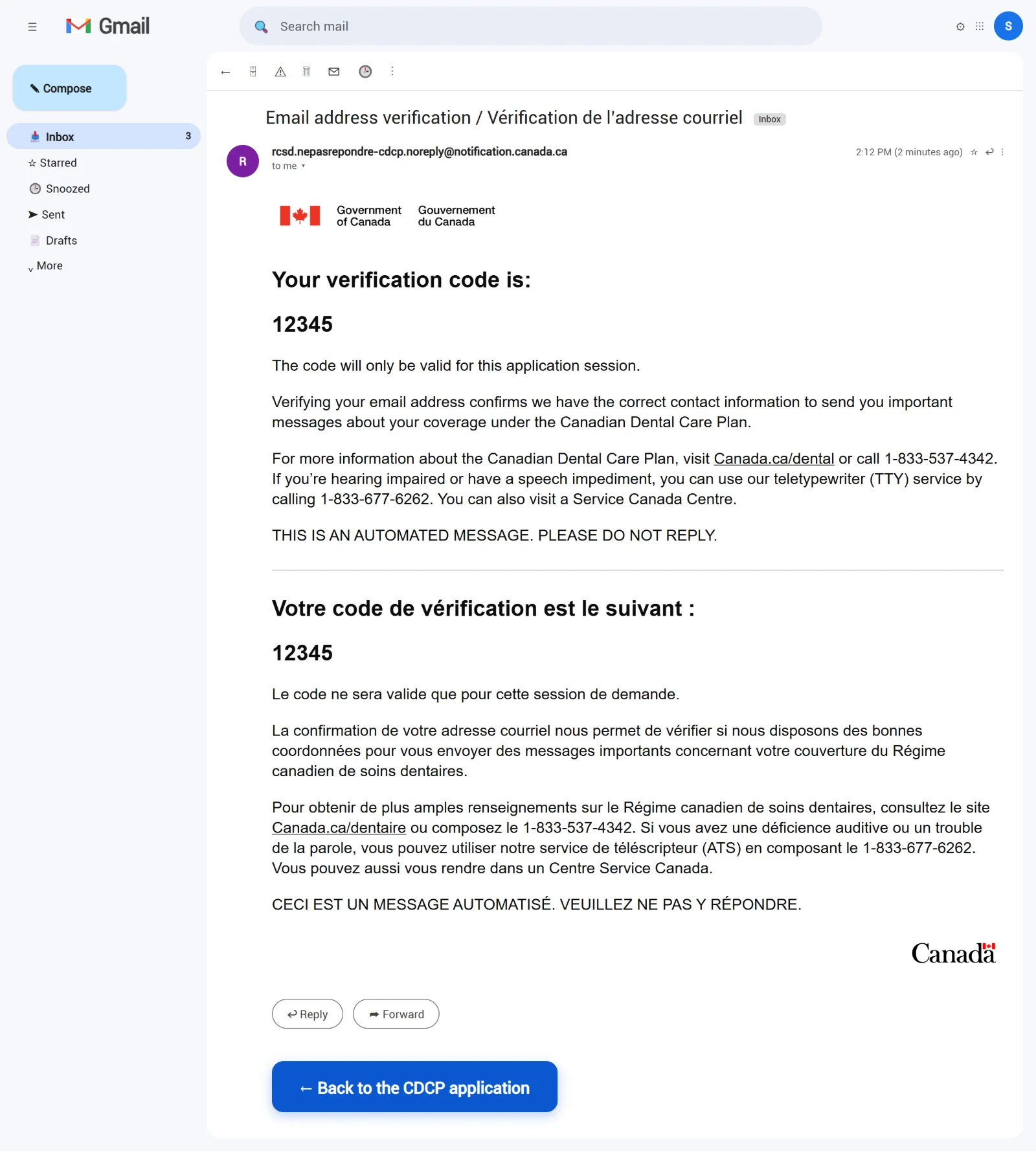
Screen 26 of 34Contact information: all done
All three parts show Complete. Press Next: Access to dental insurance.
-
Dental insurance
This is the part people get stuck on. Two questions: private insurance, then government programs. Government programs never stop you from qualifying. Only private insurance does.
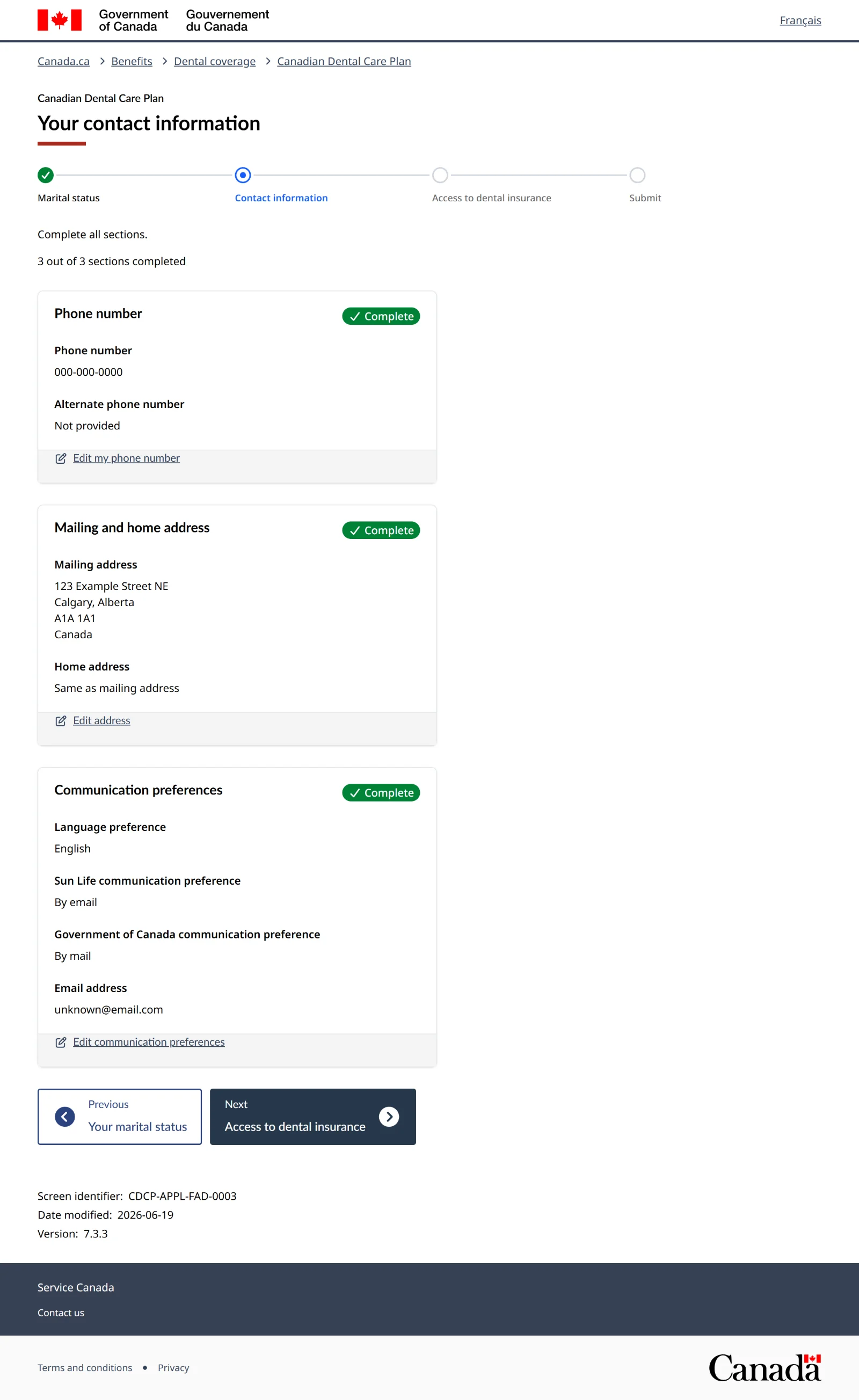
Screen 27 of 34Your access to dental insurance
Press the first Add answer.
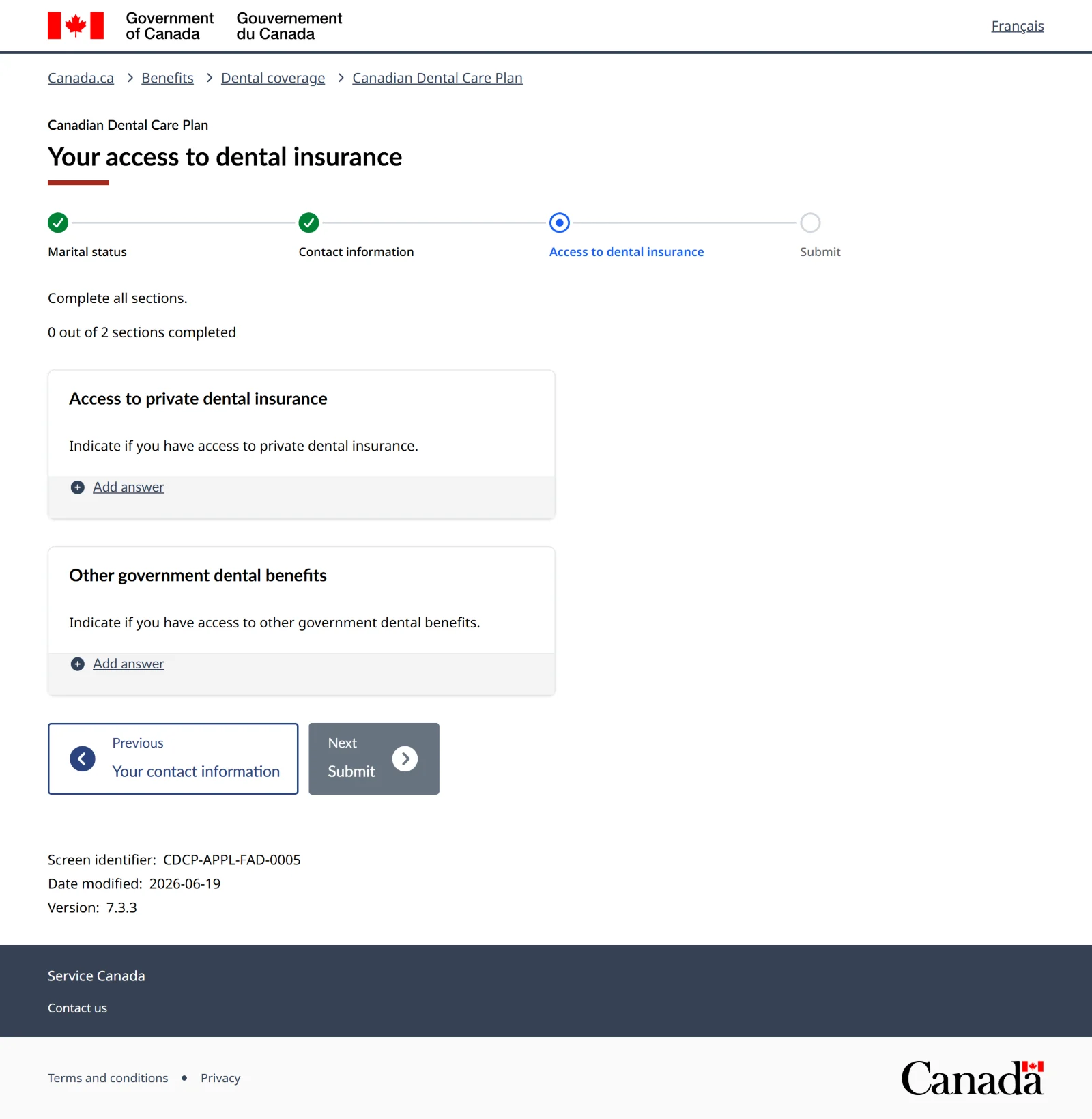
Screen 28 of 34Access to private dental insurance
Private means through a job, a pension, a family member's plan, a plan you bought, or a health spending account. If you have none of these, choose No, tick the box, and press Save.
Turned down a work plan?That still counts as having access, so you'd answer Yes, which means you don't qualify. The government checks your T4 tax slips. If one shows dental coverage you didn't have, you'll get a letter and 45 days to send proof.
Screen 29 of 34Dental insurance: 1 of 2 done
Press the second Add answer.
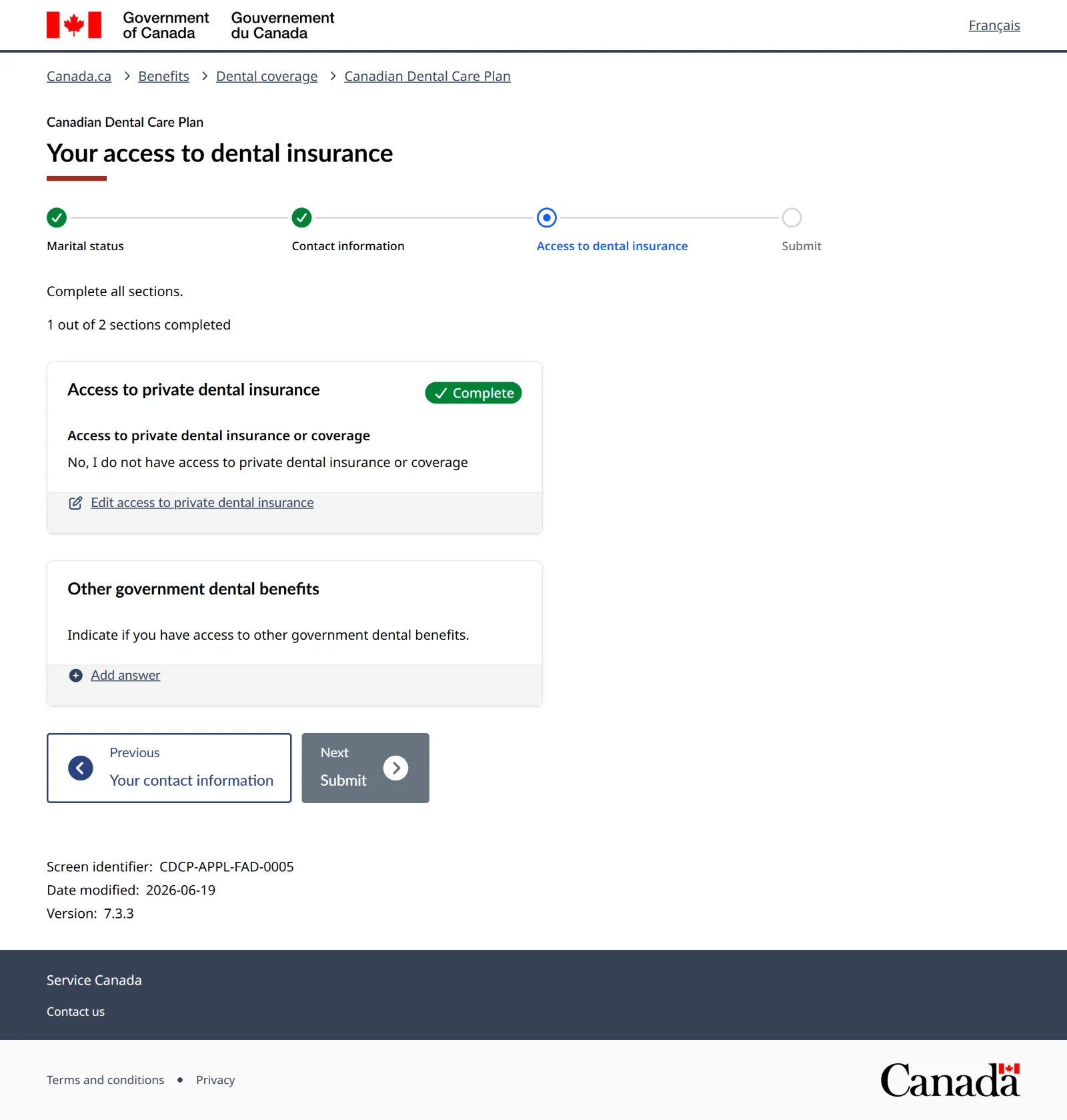
Screen 30 of 34Other government dental benefits
Two questions: a federal program, and a provincial program. Answer honestly. The screen itself says a government program won't affect whether you qualify.
Which programs countFederal: Correctional Service Canada Health Services, Non-Insured Health Benefits (NIHB) for First Nations and Inuit, Interim Federal Health Program, Veterans Affairs dental.
Alberta: AISH, Income Support, Alberta Adult Health Benefit, Alberta Child Health Benefit, and a few children's and seniors' programs.
Living in a halfway house or community correctional centre? You're usually covered by Alberta's programs, not Correctional Service Canada. If you're not sure, ask your parole officer or call 1-833-537-4342.
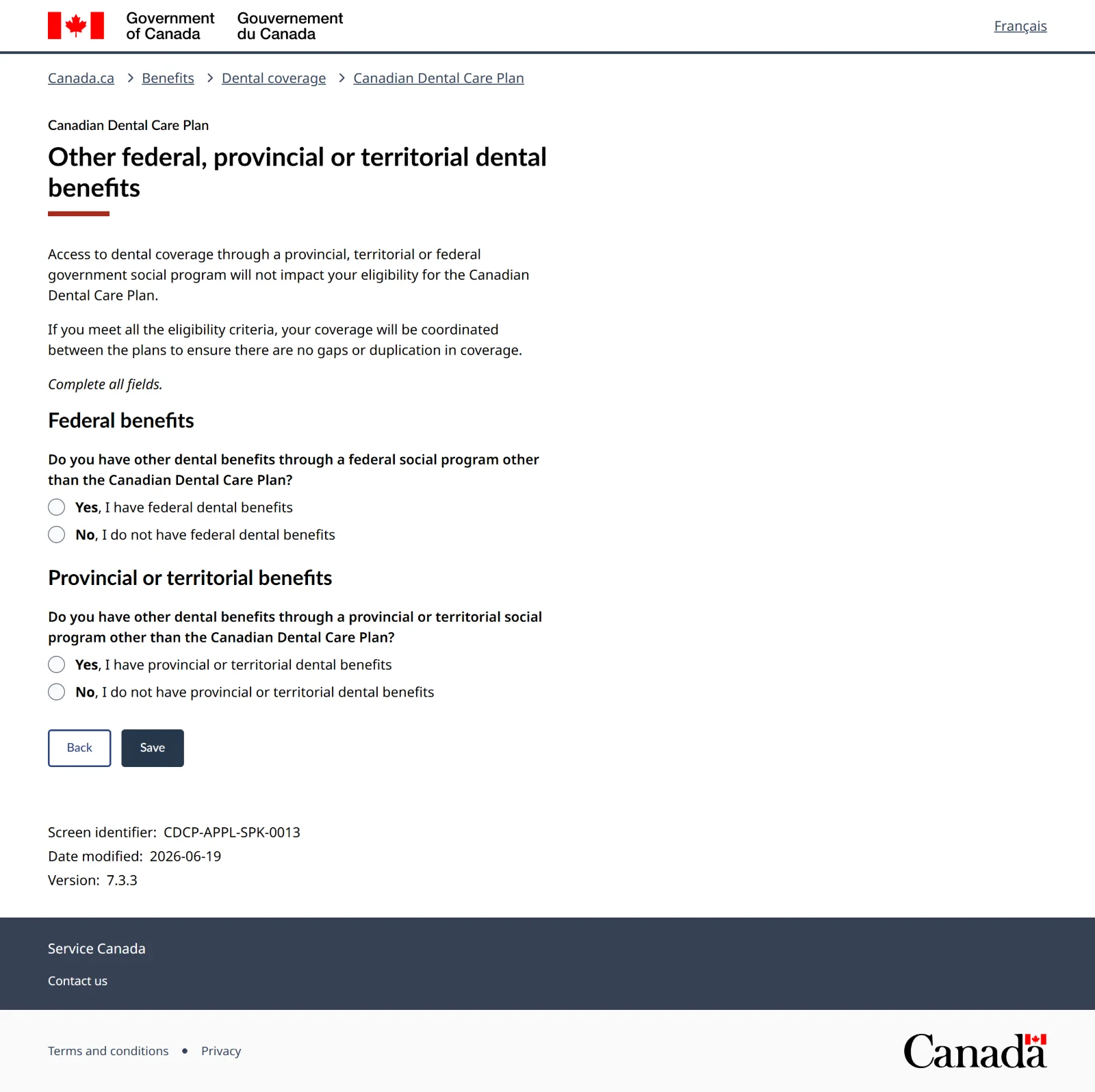
Screen 31 of 34Other government benefits: when you answer Yes
Yes on federal shows a list of programs. Pick the one you use most. Yes on provincial asks which province (Alberta), then which program. Then Save.
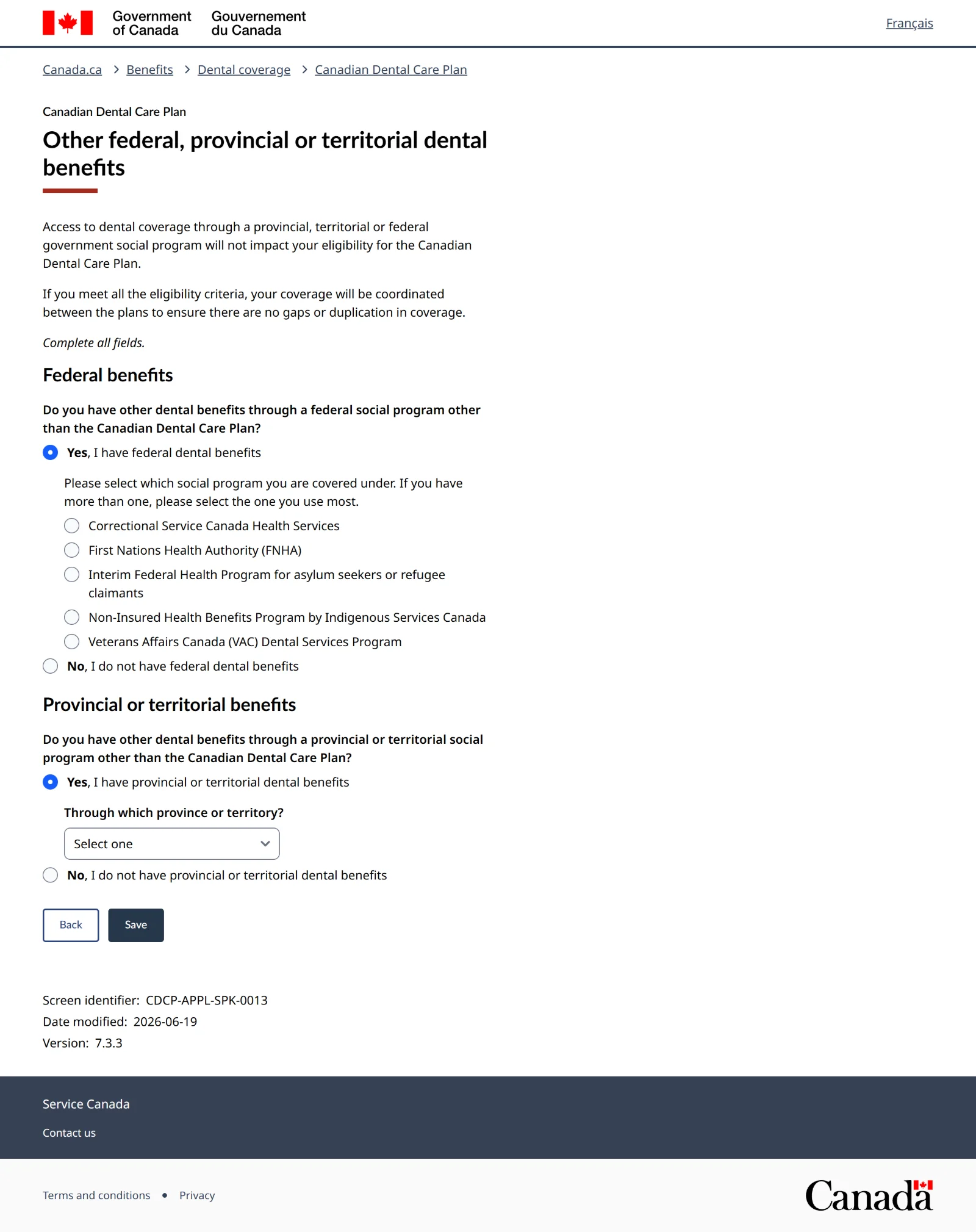
Screen 32 of 34Dental insurance: both done
Press Next: Submit.
-
Submit
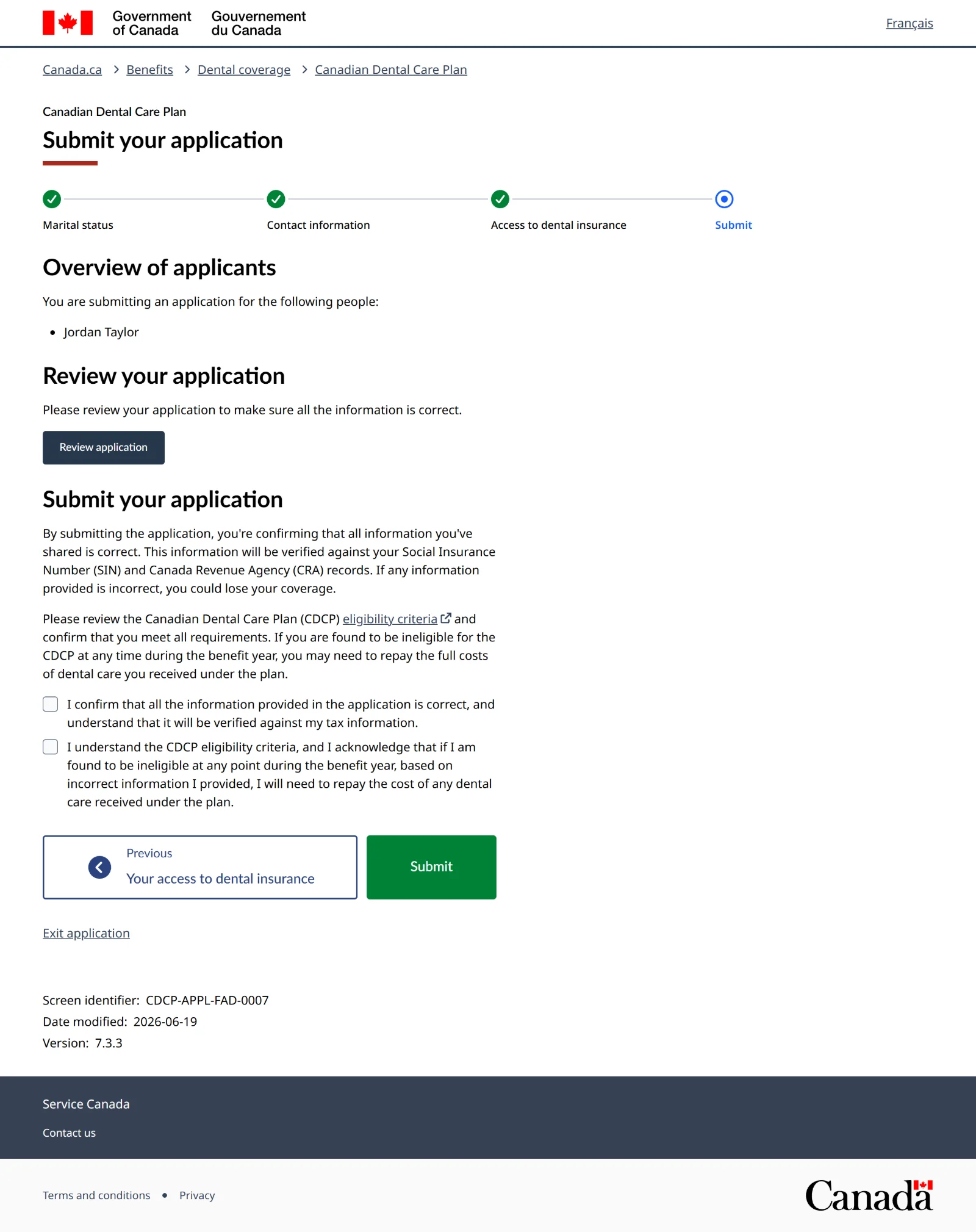
Screen 33 of 34Submit your application
Press Review application to check everything you entered. Everything gets checked against your SIN and tax records, so wrong details can cost you your coverage later. Then tick both boxes and press Submit.
Don't press ExitExit wipes the whole form.
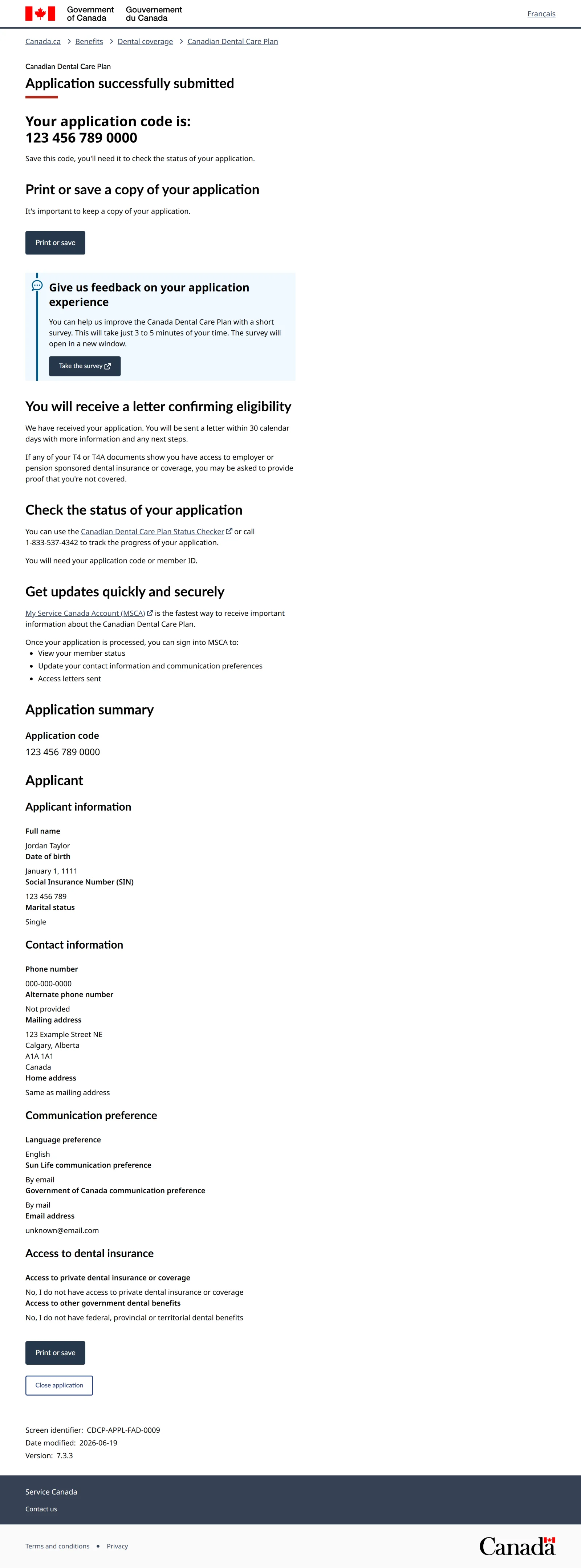
Screen 34 of 34Application submitted
In the real application, write down your application code right away, or take a photo of the screen. It only shows once, and you need it to check on your application.
After you apply
- A letter comes within 30 days, by mail or email depending on what you picked. If you're approved, it gives your member ID, your start date and what share of the cost you pay, if any.
- Sun Life mails you a welcome package and dental card. You don't need to wait for the card. Your member ID is enough to book.
- Book your visit for on or after your start date. Care before that date isn't covered.
Checking on it: use the CDCP status checker or call 1-833-537-4342. You need your application code and SIN. If it can't find your application right away, try again in a couple of days.
What you pay: if your family's adjusted net income is under $70,000, you pay nothing for covered services at CDCP rates. Between $70,000 and $79,999 you pay 40%. Between $80,000 and $89,999 you pay 60%. Some treatments need approval from Sun Life first. Ask the clinic before your visit.
Every year: the plan runs July 1 to June 30. You have to renew each year to stay covered.
Common problems and fixes
No tax return filed for last year
This is the most common thing that stops people. File your 2025 return first, even if you had no income. Then wait for your Notice of Assessment (about 2 weeks if filed online, longer by paper) and apply.
Free help filing in Calgary:
- Momentum files simple taxes for free for adults (18+) living on lower incomes. Outside tax season it's by appointment, and they can file past years too (up to 10). Book online or call 403-272-9323.
- Carya files for free for people on Income Support or AISH (no dependents) and low-income seniors 65+. Drop off March 1 to April 30, 2027, at 5000 Bowness Rd NW (403-286-1811) or 610 8 Ave SE (403-536-6558).
- More free clinics, open mostly March and April: find one on canada.ca.
Bring photo ID, your SIN and any tax slips you have. No slips? File anyway, even with no income.
Don't have a CRA account, or locked out of it
You don't need one. The online application has no login. You also don't need a My Service Canada Account or online banking.
Don't know your SIN, or lost the card
If you know the number, you're fine. Paper and plastic SIN cards aren't needed. If you don't know it, you can get it again from Service Canada with a birth certificate or citizenship document, and in person it can be the same day. It's free. Get your SIN from Service Canada.
Name doesn't match
The name on the application has to match your SIN record exactly. If your name changed, update your SIN record first (online takes about 5 business days), and tell the CRA by phone or mail. Then apply.
No fixed address
Use the address of the shelter, recovery home or halfway house where you get mail. It can be both your mailing and home address. Make sure staff know to hold mail for you, because your letter and card come by post.
No phone number
You need one to apply online. A number where you can be reached, like the house office line, works. If there isn't one, apply by phone at 1-833-537-4342 or at a Service Canada Centre.
No email
Choose By mail for both contact questions on screen 21. You won't be asked for an email.
On AISH, Income Support or Alberta Adult Health Benefit
You can still get the CDCP. Answer Yes to the provincial question on screen 30 and pick your program. The CDCP pays first, and Alberta's program can help with the rest.
First Nations or Inuit with NIHB
You can get the CDCP too if you meet the four requirements. Answer Yes to the federal question and pick Non-Insured Health Benefits. NIHB pays first.
On parole, in a halfway house, or just released
Nothing about parole stops you from applying. The usual hold-ups are a tax return that wasn't filed while you were inside, missing ID or SIN, and a mailing address. Your parole officer can help with ID and your SIN. A free tax clinic can file any missing returns.
Married or common-law
You need your partner's SIN, year of birth and their OK to share it. They must have filed their taxes too, their income counts toward the limit, and if they have a work dental plan you won't qualify. If they want coverage too, they apply on their own.
The form timed out
After 15 minutes without typing, everything is lost. Get everything on the What to have ready list together before you start.
Turned down, or no letter after 30 days
Call 1-833-537-4342 with your application code. If you were turned down, the letter says why. Fix that (for example, file your taxes) and apply again.
For staff helping residents
This section is for staff at shelters, recovery homes and halfway houses who help residents apply.
- Don't keep anyone's SIN. The resident types their own SIN. Don't write it down, photograph it or store it.
- Do keep the application code. Residents lose papers. If a question comes up later, the code is what the clinic and Service Canada need to track the application. Use the sheet below.
- Hold their mail. The approval letter and dental card come by post to your address.
- Check taxes first. Most people who get stopped never got a Notice of Assessment for last year. Sort that out before you sit down to apply.
- Want a walkthrough for your team, or a binder copy of this guide? Call Aviation Dental at 403-266-3100.
Application code log
A printable Aviation Dental sheet for keeping track of who applied and their application code. Ten residents per page. No SINs on it.
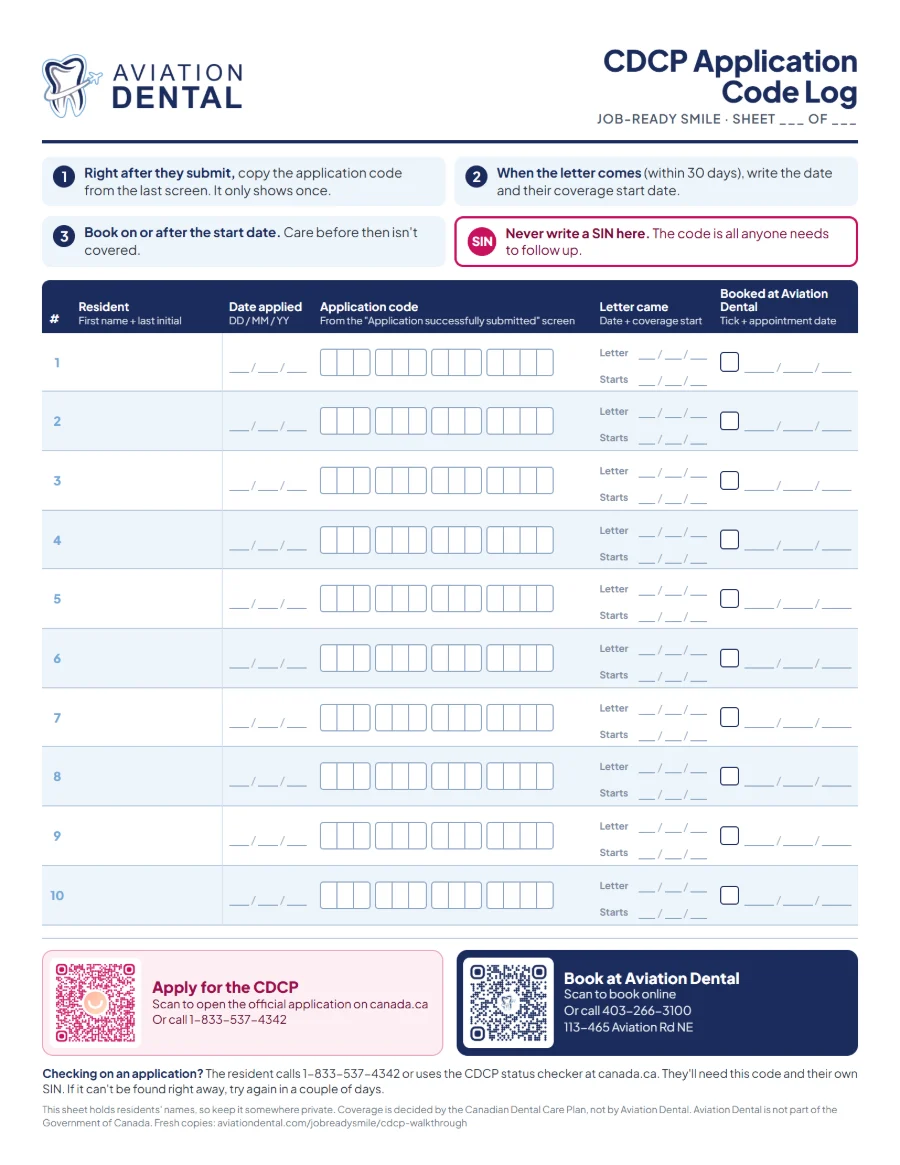
Prints on regular letter paper, upright. Want printed copies or a binder for your team? Call 403-266-3100.
Got your start date? Book your visit.
Aviation Dental in northeast Calgary accepts the Canadian Dental Care Plan. Bring your member ID, and ask us about your coverage when you book.
Or call 403-266-3100 · 113-465 Aviation Rd NE, Calgary